
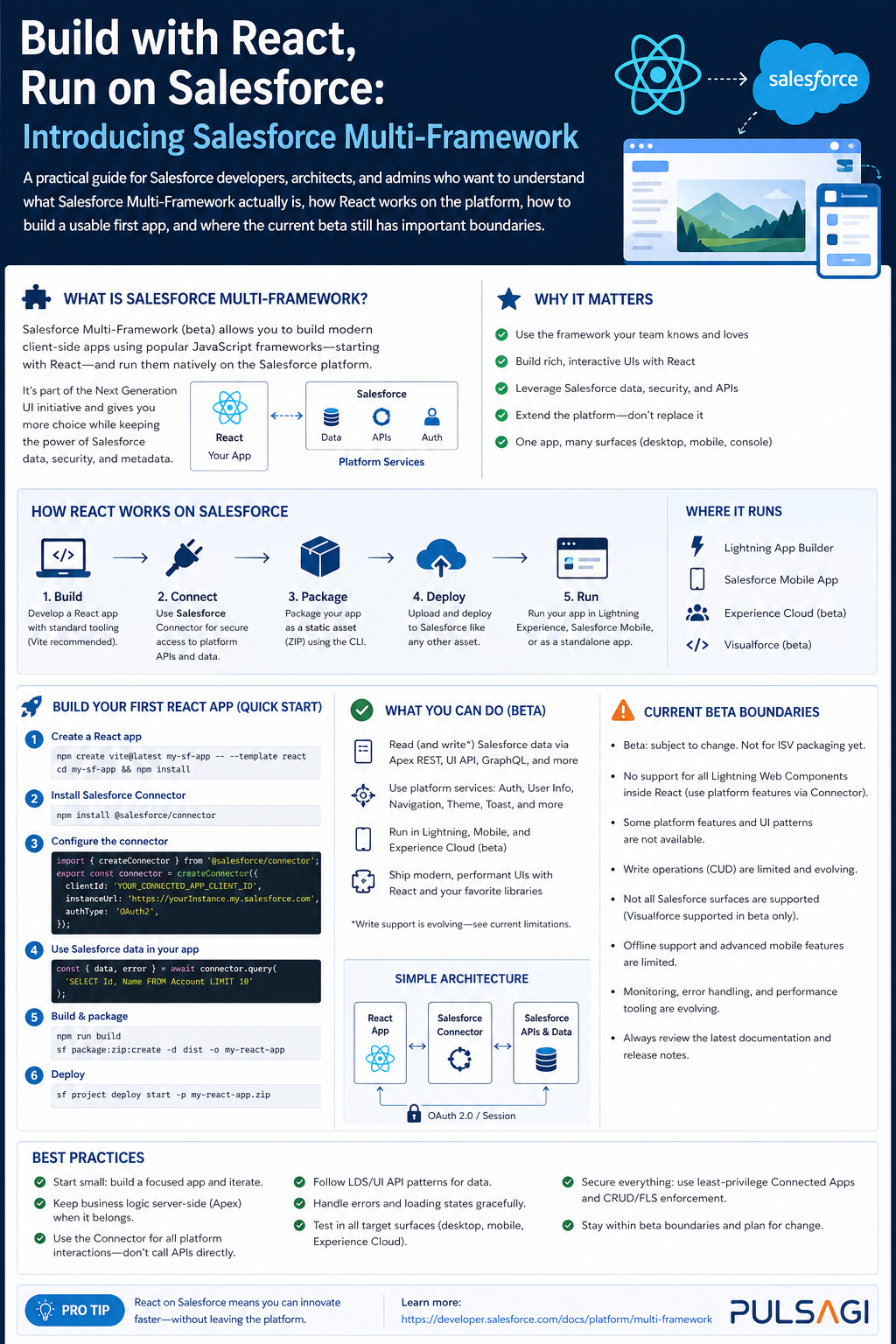
Introduction
For years, Salesforce frontend development effectively meant Lightning Web Components or Aura. That worked well when your goal was deep platform integration inside Lightning pages, but it also meant React teams had to choose between the Salesforce platform and the modern React ecosystem. Salesforce Multi-Framework changes that direction.
According to the Salesforce Developers Blog published on April 15, 2026, Salesforce Multi-Framework is a framework-agnostic runtime on the Agentforce 360 Platform that lets developers build native Salesforce apps with React. As of that announcement, React is the supported framework today, while additional frameworks are expected later.
What it is
Salesforce Multi-Framework is the runtime and metadata model that allows a non-Salesforce frontend framework, currently React, to run as a first-class application on Salesforce. The underlying app is represented in Salesforce DX by the UIBundle metadata type, and the deployed app can target the App Launcher for internal users or Experience for external-facing experiences.
The key point is that this is not "host React somewhere else and call Salesforce APIs manually." The app runs on the Agentforce 360 Platform with Salesforce-managed identity, permissions, and hosting behavior. The Data SDK handles authentication, CSRF protection, and base path resolution so the React app can access Salesforce services without the usual custom token plumbing.
| Capability | What Salesforce provides | What the React team brings |
|---|---|---|
| Runtime | Salesforce Multi-Framework on the Agentforce 360 Platform | React app code and frontend architecture |
| Metadata | UIBundle definition and deployment lifecycle |
App structure, routing, build output, and packaging discipline |
| Data access | GraphQL, UI API, Apex REST, user context, and platform services | Components, queries, mutations, and UI behavior |
| Security | Authentication, permissions, sharing, and governance | Good component design and safe server-side logic |
| Tooling | Salesforce CLI, DX project structure, Agentforce Vibes, Live Preview | Vite, npm, tests, design system, and React engineering practices |
Why it matters
Multi-Framework matters because it removes a tradeoff that many enterprise teams have felt for a long time. Before this, if a team wanted Salesforce-native governance and identity, it usually had to stay inside LWC. If it wanted React and the wider open-source ecosystem, it usually had to move the UI outside Salesforce and rebuild authentication, data access, and operational guardrails.
Why developers care
- They can use React patterns, npm packages, Vite, and familiar testing stacks.
- They can reuse design systems and component ideas across Salesforce and non-Salesforce apps.
- They can query and mutate Salesforce data without building a custom auth layer.
Why architects care
- The trust boundary stays inside Salesforce instead of moving into custom middleware.
- The app remains part of Salesforce DX source, deployment, and metadata governance.
- Internal and external app targets are modeled explicitly through metadata.
Why admins care
- User access still depends on the same Salesforce permission model.
- Org setup is explicit and reviewable instead of hidden in an external frontend host.
- The experience can still appear in familiar Salesforce entry points like the App Launcher.
The most important caveat is timing. As of April 26, 2026, Salesforce documents Multi-Framework for React as a beta capability available only in scratch orgs and sandboxes. It is not a production-ready replacement for every current LWC use case.
How React works with Salesforce
React on Salesforce works through a few platform-specific layers, not through Lightning base components or the LWC wire service. Salesforce's React guidance is clear that these apps should use standard web APIs and npm packages, with @salesforce/sdk-data as the supported bridge for Salesforce data access.
| Area | How it works in Multi-Framework | What to remember |
|---|---|---|
| Data reads and writes | Prefer GraphQL through dataSdk.graphql?.() |
GraphQL is the recommended default for record data. |
| Custom server logic | Use dataSdk.fetch?() against supported Salesforce endpoints, especially Apex REST |
Do not call raw fetch() or axios directly for Salesforce endpoints. |
| Authentication | Handled by the Data SDK and the platform runtime | No manual token handling should be needed in app code. |
| UI stack | Bring your own React component model and styling strategy | lightning/* modules and Lightning base components are not available. |
| Deployment model | App assets and metadata live together in force-app/main/default/uiBundles |
Think of the React app as a Salesforce metadata-backed application, not just a static site. |
In other words, Salesforce is not teaching React to behave like LWC. It is exposing Salesforce services to React through framework-agnostic libraries and a governed runtime.
@wire, Lightning base components, or App Builder drag-and-drop placement, React does not currently give you the same experience.
How to create a React app on Salesforce
The official setup flow is straightforward, but there are a few boundaries that matter.
- Use a sandbox or scratch org. Salesforce documents that the beta is not for production orgs.
- Confirm prerequisites such as the latest Salesforce CLI and, if you plan to use Agentforce Vibes, the relevant extension setup.
- In Setup, search for React Development with Salesforce Multi-Framework (Beta) and enable the beta. Salesforce explicitly notes that after you enable it, you cannot disable it.
- If you plan to use Agentforce Vibes for development help, activate the relevant MCP servers such as Salesforce DX MCP Server, Salesforce Metadata Experts MCP Server, and Salesforce API Context MCP Server.
- Generate a React app either from the Agentforce Vibes template or through the Salesforce CLI.
- Develop locally like a normal React app, then build and deploy the
UIBundleinto the org.
Salesforce currently documents two major app shapes:
reactinternalapp
Designed for employee-facing apps that authenticate with Salesforce credentials and are surfaced through the App Launcher.
reactexternalapp
Designed for customer or partner experiences. This path depends on Digital Experiences and Experience Cloud metadata in addition to the React app itself.
For external apps, Salesforce also documents additional Experience Cloud setup and licensing expectations. That means the "React" part is only one piece of the delivery story; org architecture still matters.
Code examples
These examples follow the direction in the current Salesforce documentation and are meant to show the practical shape of a Multi-Framework app.
1. Typical scaffold and local development flow
Salesforce documents the sf template generate ui-bundle workflow and stores the app under force-app/main/default/uiBundles. A typical internal-app flow looks like this.
sf template generate ui-bundle

cd force-app/main/default/uiBundles/myReactApp
npm install
npm run dev

# When ready, build the app and deploy the Salesforce metadata
npm run build
sf project deploy start --source-dir force-app/main/default/uiBundles/myReactApp
The exact template prompts and generated files can vary, but the important architecture is stable: the React app lives inside the DX project and deploys as a UIBundle.
2. Runtime configuration for a single-page React app
The ui-bundle.json file defines how Salesforce serves the built app. For a client-routed React SPA, a fallback to index.html is important.
{
  "outputDir": "dist",
  "apiVersion": "v66.0",
  "routing": {
    "fileBasedRouting": true,
    "trailingSlash": "never",
    "fallback": "index.html"
  }
}
This is the kind of configuration you want when your React router owns sub-routes like /dashboard or /accounts/001....
3. Query Salesforce data with GraphQL and the Data SDK
Salesforce recommends GraphQL as the preferred way to access record data from a React app. The example below uses createDataSDK() and the required gql tag.
import { useEffect, useState } from "react";
import { createDataSDK, gql } from "@salesforce/sdk-data";

const ACCOUNT_QUERY = gql`
  query RecentAccounts {
    uiapi {
      query {
        Account(first: 5, orderBy: { LastModifiedDate: { order: DESC } }) {
          edges {
            node {
              Id
              Name {
                value
              }
              Industry {
                value
              }
            }
          }
        }
      }
    }
  }
`;

export function RecentAccountsPanel() {
  const [rows, setRows] = useState([]);

  useEffect(() => {
    async function load() {
      const dataSdk = await createDataSDK();
      const result = await dataSdk.graphql?.(ACCOUNT_QUERY);
      const edges = result?.uiapi?.query?.Account?.edges ?? [];
      setRows(
        edges.map((edge) => ({
          id: edge.node.Id,
          name: edge.node.Name?.value,
          industry: edge.node.Industry?.value
        }))
      );
    }

    load().catch(console.error);
  }, []);

  return (
    <ul>
      {rows.map((row) => (
        <li key={row.id}>{row.name} - {row.industry ?? "No industry"}</li>
      ))}
    </ul>
  );
}
This pattern matters because it stays within the supported data access model and avoids writing custom token-handling code.
4. Use Apex REST when GraphQL is not enough
When you need custom business logic, orchestration, or a transactional operation that does not fit well into GraphQL, Salesforce recommends Apex REST via dataSdk.fetch?().
// Apex
@RestResource(urlMapping='/account-health/*')
global with sharing class AccountHealthApi {
    @HttpGet
    global static Map<String, Object> getHealth() {
        RestRequest req = RestContext.request;
        String accountId = req.requestURI.substringAfterLast('/');
        Account acc = [
            SELECT Id, Name, Industry, AnnualRevenue
            FROM Account
            WHERE Id = :accountId
            LIMIT 1
        ];

        return new Map<String, Object>{
            'accountId' => acc.Id,
            'name' => acc.Name,
            'industry' => acc.Industry,
            'health' => acc.AnnualRevenue != null && acc.AnnualRevenue > 1000000 ? 'Strong' : 'Monitor'
        };
    }
}
// React
import { createDataSDK } from "@salesforce/sdk-data";
export async function getAccountHealth(accountId) {
const dataSdk = await createDataSDK();
const response = await dataSdk.fetch?.(`/services/apexrest/account-health/${accountId}`);
if (!response?.ok) {
throw new Error("Failed to fetch account health");
}
return response.json();
}This is a good pattern when the UI needs purpose-built business logic instead of raw record access.
Use cases
Multi-Framework is best understood as a good fit for application-style experiences, not as a universal replacement for all component work in Salesforce.
Good fit
- Internal operational dashboards with rich React interaction patterns.
- Highly customized portals where Experience Cloud is needed but a React stack is preferred.
- Apps that need to share frontend patterns across Salesforce and non-Salesforce surfaces.
- Teams that already have strong React engineering practices and design systems.
Not the best fit
- Simple record page enhancements that fit naturally into Lightning pages.
- Use cases that depend heavily on Lightning base components or App Builder configuration.
- Immediate production rollouts that cannot accept beta constraints.
- Teams without frontend engineering maturity that mainly need admin-configurable extensions.
A helpful rule is this: choose React when you are building an app, choose LWC when you are extending Salesforce UI.
Admin and developer perspective
| Perspective | What matters most | Practical advice |
|---|---|---|
| Admin | Enablement, permissions, Experience Cloud prerequisites, and safe beta rollout | Turn it on only in the right sandbox strategy, document that it cannot be disabled, and review access model changes before exposing external experiences. |
| Developer | React architecture, GraphQL/Apex design, and deployment through DX | Use GraphQL first, keep custom logic in Apex REST only where needed, and treat the app as Salesforce metadata plus frontend code. |
| Architect | Framework choice, reusability, and long-term supportability | Do not select React only because it is fashionable. Use it when the experience justifies the extra frontend ownership compared with LWC. |
One of the healthiest adoption patterns is for admins and developers to treat Multi-Framework as a joint decision. Admins own org readiness and guardrails. Developers own frontend quality, data access discipline, and long-term maintainability.
Best practices
- Start with an internal app pilot: the App Launcher path is simpler than beginning with an external Experience Cloud rollout.
- Prefer GraphQL for record data: this aligns with Salesforce's documented guidance and keeps data access standardized.
- Use Apex REST only for real business logic: do not recreate CRUD endpoints in Apex when GraphQL or UI API already handles the need.
- Design for platform boundaries: React apps do not get Lightning base components,
@wire, orlightning/*modules. - Keep routing explicit: configure
ui-bundle.jsoncorrectly for SPA navigation and refresh behavior. - Treat styling as an architectural choice: Salesforce documentation suggests SLDS blueprints, SLDS for React, or shadcn-based approaches depending on your design direction.
- Preserve least privilege: do not assume React changes the need for good permission set, object access, and sharing design.
- Keep LWC in the toolbox: many page-level Salesforce extensions still fit LWC better than React.
Limitations
This is where teams need discipline. Multi-Framework is promising, but the current constraints are not small details.
- Beta only: official documentation currently limits React app development with Multi-Framework to scratch orgs and sandboxes.
- Language restriction in current docs: some Salesforce docs specify sandboxes and scratch orgs where English is the default language.
- Enablement is one-way: Salesforce states that once you enable the beta in an org, you cannot disable it.
- No Lightning App Builder support yet: Salesforce's launch blog says drag-and-drop App Builder placement is planned for GA, not available now.
- Not every platform API is available: Salesforce explicitly recommends checking the beta docs for known limitations.
- Experience Builder editing limitation: Salesforce documents that you cannot edit a React app's Experience Cloud site in Experience Builder.
- React is the supported framework today: "Multi-Framework" is broader in vision than in current day-one capability.
Recommendation
My recommendation is simple: adopt Salesforce Multi-Framework deliberately, not emotionally. It is a strong option for React-capable Salesforce teams that want app-style experiences, broader ecosystem access, and cleaner frontend reuse. It is not yet the default answer for ordinary Salesforce component development.
If your team mainly builds record-page enhancements, admin-configurable UI, or deeply Lightning-native components, stay with LWC. If your team needs a richer React application on Salesforce and can accept beta constraints, start with a sandbox pilot, keep the scope tight, and validate the operational model before planning anything broader.
References
- Salesforce Developers Blog: Build with React, Run on Salesforce: Introducing Salesforce Multi-Framework
- Salesforce Developers: Build a React App with Salesforce Multi-Framework (Beta)
- Salesforce Developers: Configure Your Org for React App Development (Beta)
- Salesforce Developers: Integrate Your React App with the Agentforce 360 Platform (Beta)
- Salesforce Developers: Data SDK and GraphQL (Beta)
- Salesforce Developers: Access Record Data with Data SDK (Beta)
- Salesforce Developers: React Vs LWC for Salesforce Web Development
- Salesforce Developers: Style Your React Apps (Beta)
- Salesforce Developers: GraphQL API Overview