
Introduction
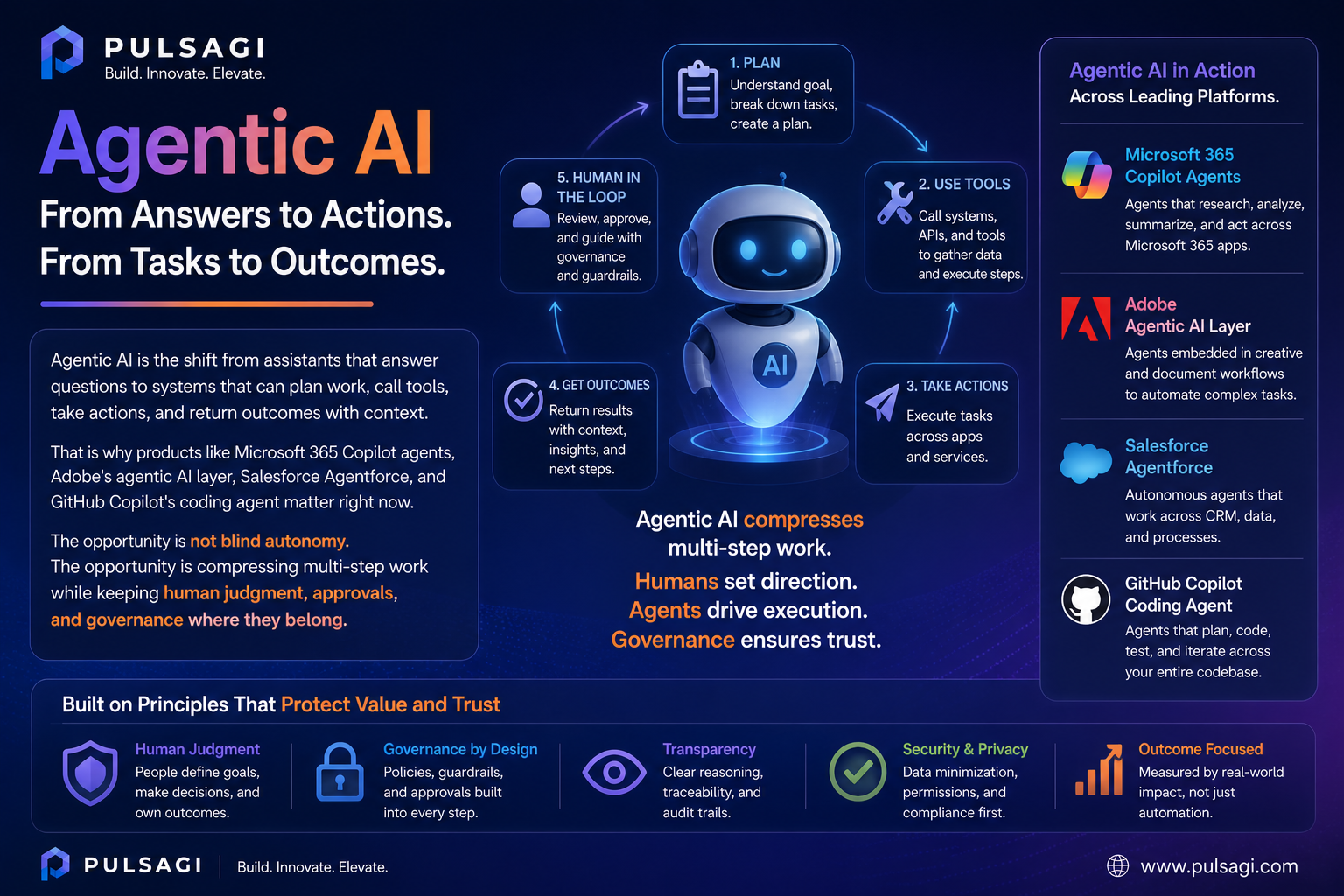
For the last two years, most mainstream AI conversations have focused on prompts, summaries, chat interfaces, and first drafts. That phase still matters, but it is no longer the whole story. The next wave is agentic AI: tools that can do more than respond. They can interpret a goal, break it into steps, use approved systems, and complete part of the work.
This article was reviewed against official product and developer documentation available on May 4, 2026.
What agentic AI is
Agentic AI refers to AI systems that can pursue an objective across multiple steps instead of stopping after one answer. In practice, that usually means the system can understand intent, retrieve context, choose or invoke tools, take actions in other systems, maintain state for the task, and return a result or escalation.
That does not mean every agent is fully autonomous. In business software, the most useful agentic systems are often semi-autonomous. They can draft a change, open a ticket, update a record, trigger a workflow, create a branch, or assemble a campaign, while still asking for approval before an irreversible action.
| Pattern | What it does | Where it stops | Why it matters |
|---|---|---|---|
| Prompt-response AI | Answers a question, generates text, summarizes content, or suggests code. | Usually stops after producing output. | Great for thinking, drafting, and exploration. |
| Agentic AI | Plans steps, retrieves context, calls tools, and moves a task forward. | Usually stops at a checkpoint, completed task, or exception. | Useful when the goal spans systems, approvals, or repeated operational work. |
| Traditional automation | Follows fixed rules, triggers, and deterministic logic. | Stops when logic ends or a branch is missing. | Still best for structured, repeatable tasks with low ambiguity. |
Practical framing: agentic AI is strongest when it combines LLM reasoning with workflow controls, enterprise permissions, and real system actions. Without those controls, it is mostly just a better chatbot.
Why it matters
The business value of agentic AI is not only faster drafting. It is fewer handoffs. A normal assistant may summarize a case and suggest what to do next. An agentic tool may summarize the case, fetch the policy, open the follow-up task, update the CRM record, and prepare the customer response for approval.
That matters because many real workflows fail in the spaces between systems. People lose time switching tabs, copying context, re-entering the same data, and translating intent from one tool to another. Agentic AI reduces that coordination tax when it is connected to the right applications.
Why leaders care
Agentic systems promise throughput gains in service, operations, marketing, and engineering because they can carry work across multiple steps instead of only producing a draft.
Why admins care
The value only holds if permissions, auditability, billing, and approval boundaries are clear. Otherwise the rollout becomes a security or governance problem.
Why developers care
The interesting engineering problem is no longer "how do I prompt a model?" It is "how do I make tools, actions, data access, retries, and fallbacks reliable?"
Why end users care
People do not want another chat window unless it removes real effort. Agents become meaningful when they can finish part of the job.
Key features
Not every product uses the same vocabulary, but the best agentic tools usually share a similar capability stack.
| Feature | What it means in practice | Why it matters |
|---|---|---|
| Goal decomposition | The system can turn one request into a sequence of smaller steps. | Required for complex tasks that cannot be solved in one response. |
| Tool use and actions | The agent can call APIs, workflows, connectors, or built-in actions. | This is what separates an agent from a text-only assistant. |
| Grounded context | The agent uses approved business data, documents, or system metadata. | Grounding reduces hallucinations and improves business relevance. |
| State and memory | The system can keep task context across multiple turns or steps. | Without state, multi-step execution becomes brittle and repetitive. |
| Human checkpoints | The agent pauses for approval, escalation, or exception handling. | Important for risk control, policy compliance, and user trust. |
| Observability | Admins or developers can inspect what the agent attempted and why. | Essential for debugging, audits, and improving task quality. |
Major tools and platforms
The market is moving quickly, but a few products already show what this shift looks like in real work.
From chat assistance to agents inside the Microsoft work stack
What it is: Microsoft documents agents in Microsoft 365 Copilot Chat as AI systems that can automate and execute business or education processes. Users can build lighter agents from the Microsoft 365 Copilot chat experience, while more advanced scenarios move into Copilot Studio.
Why it matters: Microsoft has distribution where work already happens: documents, meetings, email, search, chat, and workflow surfaces. That makes Copilot one of the clearest examples of agentic AI becoming mainstream office software instead of a specialist lab product.
Admin perspective: the admin story is central here. Microsoft exposes agent access, scenario controls, and role boundaries through the Microsoft 365 admin center and related Power Platform controls. That means rollout is not only a feature decision. It is a licensing, permissions, and policy decision.
Developer perspective: the interesting path is the bridge between prompt-level help and workflow execution. Developers and makers can extend Copilot with agents, knowledge sources, workflows, and actions rather than treating it as just a chat overlay.
Limitations: Microsoft's feature visibility varies by tenant license and configuration, and multi-system governance can get complicated fast if organizations enable agents before defining approval and data-boundary rules.
Agentic workflows for content, audience, and experience operations
What it is: Adobe positions Adobe Experience Platform Agent Orchestrator as the agentic layer behind purpose-built Experience Platform agents and the newer AI Assistant experience. Adobe's documentation now explicitly describes multi-step task execution, advanced agentic skills, and coordinated agent behavior across Experience Cloud applications.
Why it matters: Adobe's agentic direction is strong where work is already content-heavy and journey-heavy: campaign operations, audience shaping, experimentation, optimization, and marketing execution. This is not generic office AI. It is workflow AI built around content and customer experience systems.
Admin perspective: Adobe admins need to care about permissions, brand governance, content approval, data quality, and who can trigger which operational actions. In marketing stacks, the risk is often not only hallucination. It is ungoverned scale.
Developer perspective: Adobe's value is less about free-form coding and more about orchestrating agent behavior around real experience data, content pipelines, and application workflows. The technical question becomes how safely and clearly those agents are grounded in business context.
Limitations: Adobe's agentic layer is compelling if your organization already lives in Experience Cloud. It is much less relevant as a universal AI platform for teams that do not work inside Adobe's data and experience ecosystem.
Agentic CRM and service execution with platform actions
What it is: Salesforce describes Agentforce as the agent-driven layer of the Salesforce Platform. Its documentation focuses on agents that work alongside employees, use the Trust Layer, and connect to actions, prompts, APIs, and business data. Salesforce also notes that, beginning in April 2026, some documentation now uses the term subagents for what were previously called agent topics.
Why it matters: Salesforce is a strong fit for agentic AI when the job depends on CRM context, service workflows, case handling, data updates, or action-taking inside platform-controlled processes. The system already knows the customer, the object model, the permissions, and the workflow entry points.
Admin perspective: this is where admins become critical. Good Agentforce outcomes depend on object security, field-level access, prompt grounding, action configuration, and a clear decision about which tasks agents may complete without approval.
Developer perspective: Agentforce is meaningful because it is not only a conversation product. Salesforce exposes actions, APIs, SDKs, DX tooling, and testing surfaces, which gives developers a real platform for building operational agents instead of only prompt experiments.
Limitations: Agentforce is strongest when the data model and workflow design are already disciplined. If the underlying org is messy, the agent will expose that mess faster rather than fix it.
Agentic software execution inside the development lifecycle
What it is: GitHub documents Copilot coding agent as a mode where Copilot can work independently in the background to complete tasks such as bug fixes or incremental features. You can assign issues, let it prepare changes, and review the resulting pull request.
Why it matters: This is one of the clearest developer-facing examples of "acts, not just responds." Instead of only suggesting code in an editor, the system can take ownership of a bounded task and move it through a real engineering workflow.
Admin perspective: GitHub emphasizes governance controls, organization policies, and a restricted development environment. That is the right pattern. Coding agents are useful, but only when repository access, action budgets, and review expectations are explicit.
Developer perspective: this can remove a surprising amount of low-to-medium complexity work, especially bug fixes, repetitive refactors, and isolated implementation tasks. The catch is that developers still need to review the output with the same seriousness as human-written code.
Limitations: coding agents do not remove the need for architecture judgment, domain understanding, or production accountability. They are best seen as execution accelerators, not self-managing engineering replacements.
Use cases
Agentic AI becomes easier to understand when you map it to a workflow instead of a buzzword.
Meeting follow-through and internal workflow execution
An agent can read meeting context, identify follow-up tasks, draft the action list, open the task items in the right system, and prepare the summary for approval. A normal assistant helps you think about next steps. An agent helps you close the loop.
Audience, content, and journey operations
An Adobe-centered team can use agentic workflows to assemble content variants, adjust audiences, surface insights, and recommend or initiate journey optimizations. Human review still matters, but the execution surface becomes much wider than chat-based help alone.
Case triage, record updates, and guided service actions
A Salesforce-centered agent can classify the request, retrieve account context, suggest next-best actions, create follow-up tasks, and update fields or case data through approved actions. This is where trust, permissions, and audit history are more important than flashy demos.
Bounded coding tasks and review-ready pull requests
A coding agent can take a bug ticket, inspect the repository, prepare a change, run part of the workflow, and hand back a pull request for review. That is a meaningful productivity change because it touches the actual delivery pipeline, not only the ideation stage.
Admin and developer perspective
The most common mistake in agentic AI adoption is buying the narrative before designing the operating model.
| Role | What to evaluate first | What good looks like | Common mistake |
|---|---|---|---|
| AI admin / IT admin | Identity, roles, billing, data boundaries, logging, and approval design. | Agents are enabled only where policy, licensing, and observability are ready. | Turning on broad access before documenting who can trigger what. |
| Business system admin | Record quality, workflow rules, exception paths, and irreversible actions. | Agents operate in clean processes with clear human checkpoints. | Assuming the agent will compensate for bad process design. |
| Developer | Tool contracts, retries, idempotency, evaluation, and fallback behavior. | Actions are reliable, testable, permission-aware, and easy to observe. | Optimizing prompts while ignoring action reliability and monitoring. |
| Team lead / business owner | Success metrics, adoption fit, risk tolerance, and escalation design. | One or two measurable workflows improve before scaling broadly. | Launching an "AI agent strategy" with no concrete workflow owner. |
My view: agentic AI is much more of an operations design problem than a prompt-writing problem. The teams that win will usually be the ones with the cleanest permissions, clearest actions, and strongest review loops.
Best practices
- Start with bounded workflows: begin where the task has a clear input, a known system of record, and a visible success condition.
- Separate read, recommend, and act permissions: not every agent that can see data should also be allowed to change data.
- Keep human approval for risky steps: payments, deletions, customer-facing commitments, and security changes should not be silently automated.
- Design actions to be idempotent: an action should not create damage if retried after a timeout or partial failure.
- Ground the agent in trusted systems: agents become more useful when they pull from approved data and process context, not only open-ended chat history.
- Instrument the workflow: log plans, tool calls, failures, and escalations so you can improve the system with evidence.
- Measure operational outcomes: track completion rate, human intervention rate, error rate, and time saved, not only demo quality.
- Train users on control, not magic: people should know when to delegate, when to review, and when to override.
Limitations
Agentic AI is promising, but there are real limits that responsible teams should say out loud.
- Action multiplies risk: when AI moves from suggestions to system changes, the cost of a mistake rises.
- Enterprise data quality still matters: agents do not fix broken object models, bad taxonomies, or missing workflow ownership.
- Autonomy is uneven: many so-called agents are still tightly bounded assistants with only selective action capability, and that is often a good thing.
- Costs can spread across layers: token usage, workflow runs, premium requests, connector calls, and platform consumption all add up.
- Vendor terminology varies: one product's "agent" may be another product's assistant, workflow, or action wrapper, so compare capabilities carefully.
- Observability is still maturing: many platforms now expose controls and logs, but debugging multi-step behavior is still harder than debugging deterministic automation.
Recommendation
If you want a practical recommendation, it is this: do not adopt agentic AI as a slogan. Adopt it as a workflow design decision.
If your company already runs heavily inside Microsoft 365, start by piloting Copilot agents for internal knowledge, follow-through, and structured workplace flows. If your main bottleneck is marketing operations or customer experience orchestration, Adobe's agentic stack is a more natural fit. If your work lives in CRM, service, or platform actions, Agentforce deserves serious attention. If your highest-value problem is engineering throughput, GitHub Copilot's coding agent is one of the clearest places to test agentic execution today.
For most teams, the right path is one high-value use case, one human owner, clear guardrails, and real instrumentation. That will teach you more than a broad agent rollout ever will.
Best-fit recommendation: choose the platform that already owns your system of work, then add agentic capability where it reduces handoffs without weakening accountability.
References
- Microsoft Learn: Using agents in Microsoft 365 Copilot Chat
- Microsoft Learn: Manage Microsoft 365 Copilot scenarios in the Microsoft 365 admin center
- Adobe Experience League: Agentic AI in Adobe Experience Cloud
- Adobe Experience League: Adobe Experience Platform Agent Orchestrator
- Salesforce Developers: Get Started with Agentforce and AI Agents
- GitHub Docs: About GitHub Copilot coding agent