
Introduction
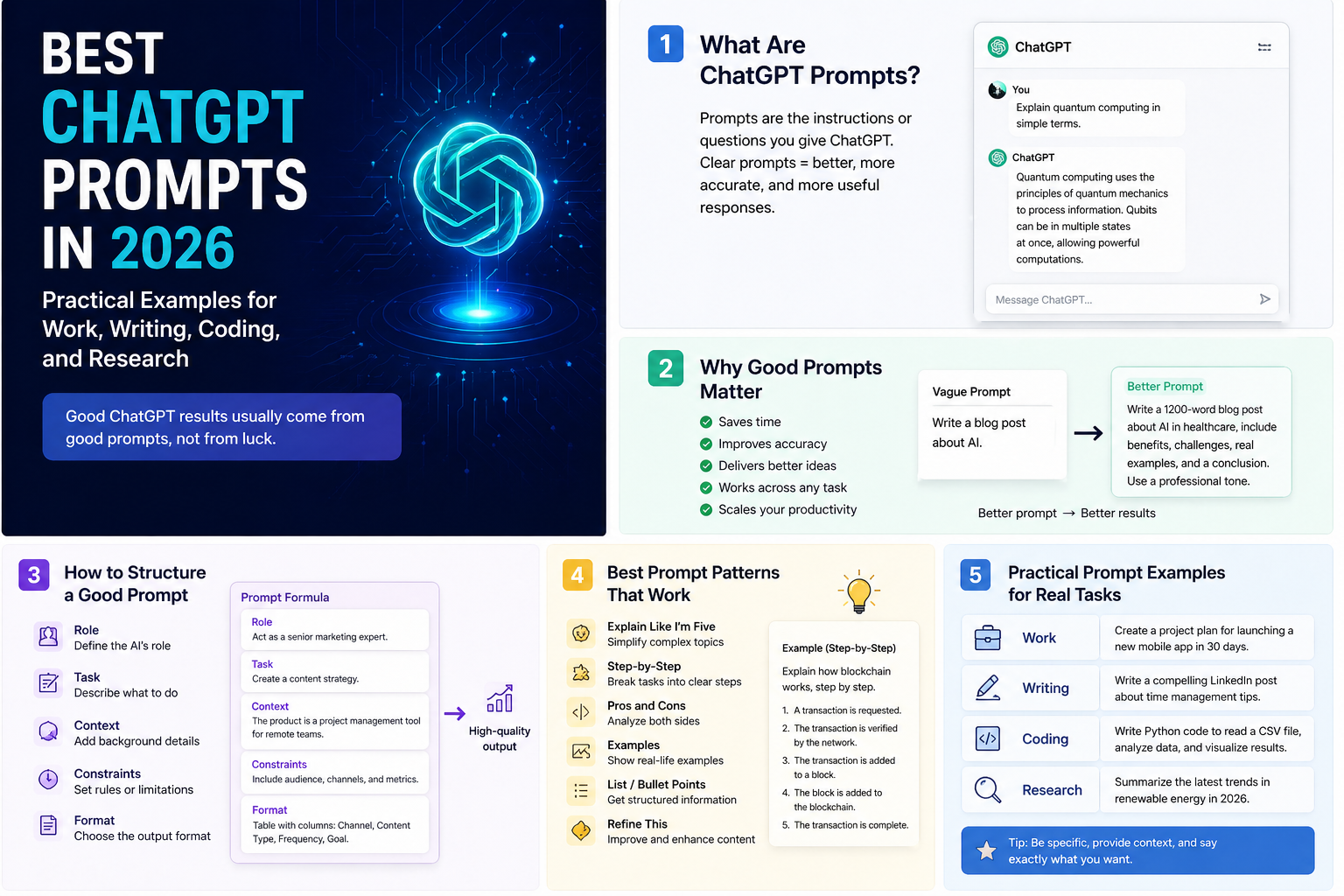
A ChatGPT prompt is the instruction, question, context, or input you give to ChatGPT to start or guide a response. That sounds simple, but in practice the quality of your output depends heavily on how clearly you describe the job, the audience, the format, and the constraints.
OpenAI's official guidance reviewed on January 31, 2026 is consistent across ChatGPT help articles, OpenAI Academy, and developer docs: be clear, provide context, describe the output you want, and improve the prompt iteratively when needed.
What a ChatGPT prompt is
According to OpenAI's Help Center, a prompt is the input that initiates a conversation or triggers a response from the model, and it can be text, image, or audio. In day-to-day usage, most prompts are text instructions that tell ChatGPT what to do, what context to use, and how the result should look.
| Prompt element | What it does | Example |
|---|---|---|
| Task | Tells ChatGPT what job to do. | "Summarize this transcript." |
| Context | Provides background so the answer is more relevant. | "This is for an executive audience that wants only business risks." |
| Format | Defines how the output should be shaped. | "Return a 5-row table." |
| Constraints | Sets boundaries such as length, tone, or exclusions. | "Keep it under 150 words and avoid jargon." |
| Examples | Shows the model what "good" looks like. | "Use this sample structure as the template." |
Why ChatGPT prompts matter
OpenAI Academy's prompting fundamentals page makes the core point well: ChatGPT works best when you give it clear instructions. Better prompts matter because they improve output quality, reduce back-and-forth, and make the tool more reliable for repeatable workflows.
Better quality
Specific prompts produce responses that are closer to your actual goal.
Less rework
Good prompt structure reduces the need to keep correcting the answer.
More consistency
Team-friendly prompt patterns are easier to reuse across similar tasks.
Safer collaboration
Clear prompts make it easier to review whether the output matched the ask.
For individual users, this means faster results. For teams, it means prompt quality becomes an operational asset rather than a personal trick.
Anatomy of a strong prompt
OpenAI's current guidance can be translated into a simple structure that works well in ChatGPT:
Act as [role or perspective].

Your task: [what you want done].

Context:
- [important background]
- [audience]
- [source material or assumptions]

Output requirements:
- [format]
- [length]
- [tone]
- [must include / must avoid]

If anything is unclear, state your assumptions first.
What usually helps
- Clear action verbs like
summarize,draft,review, orcompare. - Audience guidance such as executive, technical, customer-facing, or beginner.
- Explicit format requests like bullet list, table, checklist, or email draft.
- Constraints on length, tone, priority, and exclusions.
What usually hurts
- Vague asks like "make this better" with no context.
- Large multi-part tasks with no structure.
- No definition of what the final output should look like.
- Trying to solve planning, drafting, analysis, and formatting in one messy sentence.
Few best ChatGPT prompts
There is no single best prompt for everything, but these are some of the most reusable prompt patterns for real work.
1. Best prompt for summarization
Summarize the text below for a busy executive.

Requirements:
- Use 5 bullet points
- Keep it under 120 words
- Include the 2 biggest risks
- End with 1 recommended next step

Text:
"""
[paste content here]
"""
Why it works: it defines audience, format, length, and decision value.
2. Best prompt for writing a professional email
Draft a professional email to [person or team].

Goal:
- [what the email needs to achieve]

Context:
- [important background]
- [relationship or tone context]

Requirements:
- Keep it concise
- Sound confident but respectful
- Include a clear call to action
- Give me 2 subject line options
Why it works: it avoids generic fluff and anchors the email to a real outcome.
3. Best prompt for coding help
Review the code below like a senior engineer.

Focus on:
- correctness bugs
- edge cases
- likely regressions
- missing tests

Output format:
1. Findings first, ordered by severity
2. Then suggested fixes
3. Then example test cases

Code:
```[paste code here]```
Why it works: it tells ChatGPT exactly how to think and how to return the answer.
4. Best prompt for research comparison
Compare [option A] and [option B] for [use case].

Requirements:
- Use a table
- Compare cost, complexity, speed, risks, and best-fit scenarios
- End with a recommendation
- If anything is uncertain, state it explicitly
Why it works: it encourages structured reasoning and makes uncertainty visible.
Many prompt examples
The examples below are intentionally practical and reusable. You can paste them into ChatGPT directly and then replace the placeholders.
Weekly planning prompt
Help me plan my week.

Context:
- My role: [job title]
- My top priorities: [list]
- Constraints: [meetings, deadlines, travel, etc.]

Output:
- A day-by-day plan from Monday to Friday
- Top 3 priorities per day
- Risks or overload warnings
- A suggested focus block scheduleMeeting notes to action items prompt
Turn these meeting notes into an action-oriented summary.

Requirements:
- Start with a 3-bullet executive summary
- List decisions made
- List action items with owner and due date placeholders
- Call out open questions

Notes:
"""
[paste notes]
"""Rewrite for clarity prompt
Rewrite the text below for clarity.

Requirements:
- Preserve the meaning
- Make it easier to read
- Remove repetition
- Keep the tone professional
- Give me both:
  1. a polished version
  2. a shorter version

Text:
"""
[paste draft]
"""
Research brief prompt
Create a research brief on [topic].

Include:
- what it is
- why it matters
- current trends
- major risks or controversies
- practical implications for [my team / business]

Output format:
- short overview
- bullet list of findings
- 3 recommendationsSlide outline prompt
Create a presentation outline for [topic].

Audience:
- [executives / clients / internal team]

Requirements:
- 8 to 10 slides
- one-line purpose for each slide
- suggested title for each slide
- note where charts or visuals would helpBug investigation prompt
Help me debug this issue.

Problem:
- [describe the bug]

Context:
- expected behavior
- actual behavior
- environment / stack
- relevant logs or error messages

Output:
- likely root causes ranked from most likely to least likely
- what to test first
- fixes to try
- how to prevent this in futurePRD drafting prompt
Draft a lightweight product requirements document for [feature].

Include:
- problem statement
- target users
- goals and non-goals
- user stories
- edge cases
- acceptance criteria
- launch risksTable or spreadsheet analysis prompt
Analyze the data below and identify the most important insights.

Requirements:
- highlight trends
- call out anomalies
- identify likely causes if visible
- suggest 3 decisions a manager could make from this data
- keep the language non-technical

Data:
"""
[paste rows or attach file]
"""Explain simply prompt
Explain [topic] to me like I'm new to it.

Requirements:
- avoid jargon
- use one simple analogy
- keep it under 200 words
- end with 3 follow-up questions I should ask nextImprove my prompt prompt
Improve the prompt below.

Your goals:
- make it clearer
- reduce ambiguity
- add useful structure
- preserve the original intent

Return:
1. improved prompt
2. why it is better
3. optional advanced version

Original prompt:
"""
[paste prompt]
"""
Admin and developer perspective
Prompt quality becomes more important when ChatGPT use moves from personal experimentation to team workflows.
| Perspective | What matters most | Practical guidance |
|---|---|---|
| Admin / team lead | Consistency, governance, training, and safe data use. | Create approved prompt patterns for common tasks such as summaries, emails, and meeting outputs. Also define what data users should not paste into external tools. |
| Developer | Repeatability, evaluation, and prompt lifecycle management. | OpenAI's developer docs now support long-lived prompt objects with versioning, variables, reuse across APIs and the dashboard, and rollbacks. That matters when prompts become part of a product workflow instead of ad hoc chat usage. |
| Operations / leadership | Output quality, adoption, and measurable productivity. | Standardize a small library of high-value prompts and review where they reduce rework, accelerate reporting, or improve communication quality. |
One useful boundary is this: for casual personal use, prompt writing can stay lightweight. For repeatable business workflows, prompt structure should be treated more like documentation or process design.
Best practices
- Be clear and specific: OpenAI's help guidance is consistent on this point because vague prompts create vague outputs.
- Give useful context: tell ChatGPT who the answer is for, why the task matters, and what source material to use.
- Describe the ideal output: include format, tone, length, and must-have elements.
- Break large tasks into steps: multi-part workflows usually work better as staged prompts than one overloaded instruction.
- Iterate: refine the prompt based on the first answer instead of expecting perfection on turn one.
- Ask for options when helpful: OpenAI Academy explicitly recommends asking for alternatives when you want choice.
- Use custom instructions carefully: OpenAI says custom instructions are available on all plans across web, desktop, iOS, and Android, but they apply broadly, so keep them stable and useful rather than overly task-specific.
- For team workflows, version prompts: if prompts are tied to products or automations, use a controlled lifecycle rather than editing live behavior informally.
Limitations
Even a strong prompt does not guarantee a perfect answer. Prompting improves the odds, but it does not remove the model's limits.
- Good prompts do not eliminate hallucinations: outputs still need human review for high-stakes tasks.
- Prompt quality is only one factor: model choice, context quality, and source material also affect results.
- Overly long prompts can become noisy: more detail is often helpful, but irrelevant detail can reduce quality.
- Custom instructions are broad, not surgical: they are useful for stable preferences, not for every one-off task.
- Prompt recipes age: OpenAI's guidance and product capabilities evolve, so prompt patterns that work best today may need revision later.
Recommendation
The best approach is simple: treat prompt writing as practical communication design. Start with a clear task, add only the context that matters, define the output, and refine from there.
If you only remember one pattern, remember this one: goal + context + format + constraints. That structure is enough to improve most ChatGPT usage immediately.
For teams, go one step further. Save your best prompts, standardize the ones that create repeatable value, and review them the same way you would review a template, workflow, or internal playbook.