
Introduction
One of the most misunderstood parts of Salesforce security is the difference between with sharing, without sharing, inherited sharing, and writing an Apex class with no sharing keyword at all. These four choices look small in code review, but they can completely change what data a user sees and what your Apex transaction can do.
This matters even more now because many teams use AI code assistants to scaffold controllers, services, and integration classes. AI-generated Apex often compiles, but it does not always make a safe decision about sharing context. If a class boundary is wrong, the code may still pass unit tests while leaking records in production.
Security.stripInaccessible(), or explicit describe checks where appropriate.
What sharing keywords actually control
Salesforce data security has multiple layers. Sharing keywords affect only the record-level layer: whether the current user should be able to see or operate on a specific record according to organization-wide defaults, role hierarchy, territory rules, teams, and manual or criteria-based sharing.
That means a class can be perfectly correct on sharing and still be insecure on fields. A user may have access to the record but not to a sensitive field like salary, margin, or PII. This is why strong Apex design always treats sharing and CRUD/FLS as separate checks.
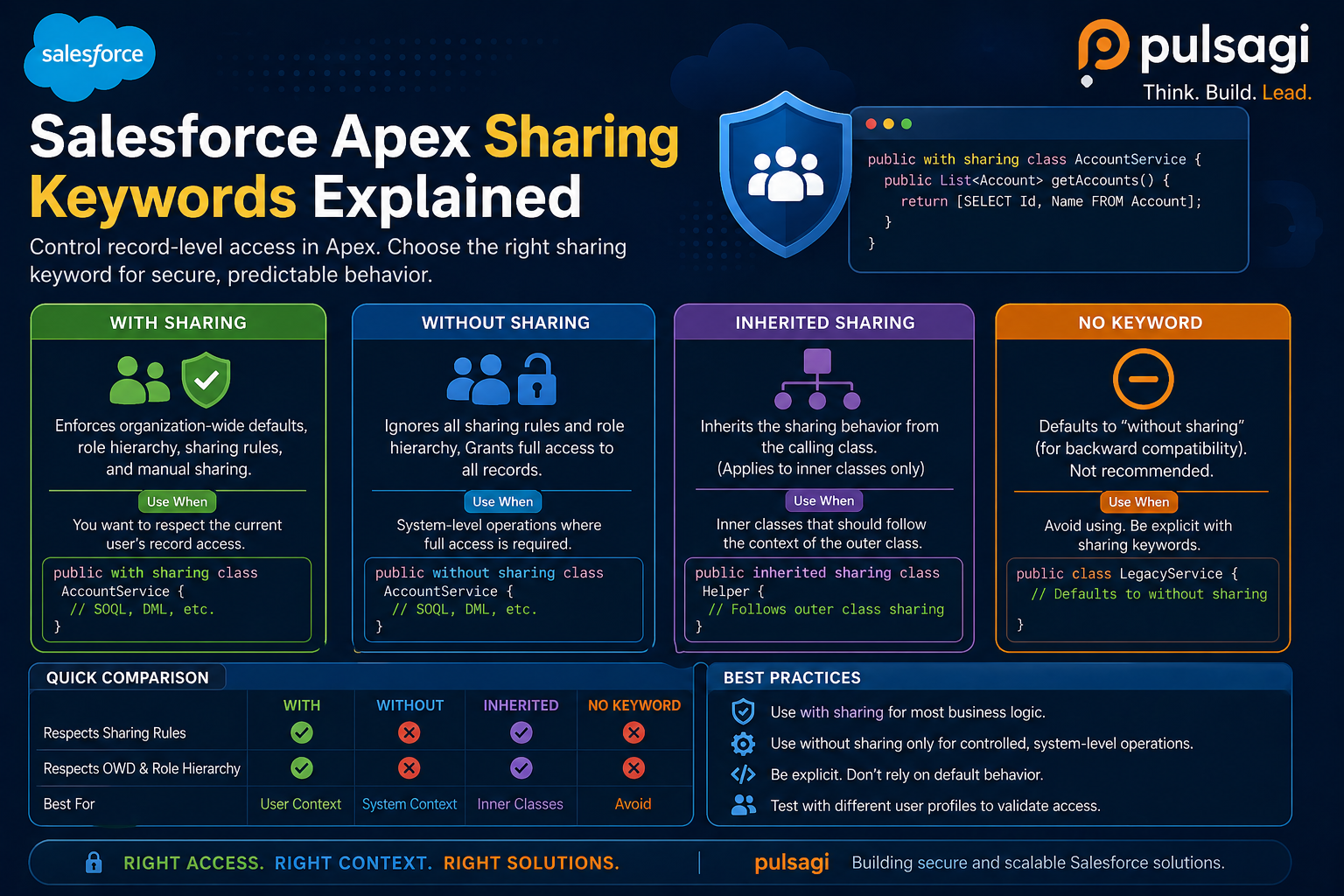
| Keyword | What it does | When it fits | Main risk |
|---|---|---|---|
| with sharing | Respects record-level access for the running user. | Controllers, UI services, and most business logic. | Teams wrongly assume it also enforces field and object permissions. |
| without sharing | Runs without record-sharing checks. | Privileged system operations with a clear business justification. | Easy to overuse and hard to defend in security review. |
| inherited sharing | Uses the sharing mode of the calling code. | Reusable service classes that must behave safely in multiple entry paths. | Needs careful review because runtime context decides the final behavior. |
| No keyword | Also inherits context, but with less explicit intent. | Usually not recommended. | Ambiguous at code review and riskier at transaction entry points. |
with sharing
with sharing is the safest default for most Apex classes that sit near users, screens, flows, LWC controllers, Experience Cloud endpoints, or admin-triggered automation. It tells Salesforce to respect the running user's record access when the class executes database work.
For admins, this usually aligns better with what users expect from the UI. If a sales rep cannot see an opportunity in Salesforce, they generally should not retrieve it through Apex-backed page logic either. For developers, it creates a more predictable trust boundary and reduces the chance of accidental overexposure.
public with sharing class OpportunitySummaryService {
    public static List<Opportunity> getMyPipeline() {
        return [
            SELECT Id, Name, StageName, Amount
            FROM Opportunity
            WHERE IsClosed = false
            ORDER BY CloseDate
            LIMIT 50
        ];
    }
}
The example above respects record-level visibility, but it still assumes the user can read Amount. If field access is sensitive, pair this with WITH USER_MODE or another CRUD/FLS enforcement pattern.
without sharing
without sharing intentionally bypasses record-sharing rules. This can be legitimate, but only when the business process truly requires system-level visibility. Typical examples include controlled reconciliation jobs, back-office repair scripts, platform-managed recalculation, or tightly governed admin operations.
What makes this keyword dangerous is not that it exists. The problem is that teams often use it to "make the query work" instead of designing the right security model. That is exactly the kind of shortcut that later fails security review or creates trust problems with admins who thought permissions were already protecting the data.
public without sharing class OrderReconciliationJob {
    public static void reconcile(Set<Id> orderIds) {
        List<Order__c> orders = [
            SELECT Id, Status__c, External_Id__c
            FROM Order__c
            WHERE Id IN :orderIds
        ];

        // System-level reconciliation logic goes here.
    }
}without sharing, document why it must ignore record visibility, who approved that design, and what compensating controls protect the data path.
inherited sharing
inherited sharing is the most deliberate way to say, "this class should follow the caller's sharing model." It is useful for service-layer code that may be invoked from both user-facing controllers and trusted internal processes, as long as the service is written to remain safe in both contexts.
Salesforce Developer guidance treats this as an advanced option, not a casual shortcut. That is fair. The runtime behavior is flexible, but the class must be reviewable. When a future developer reads the file, they should understand that context sensitivity is intentional.
public inherited sharing class CaseEscalationService {
    public static List<Case> findOpenCasesForAccount(Id accountId) {
        return [
            SELECT Id, CaseNumber, Status, Priority
            FROM Case
            WHERE AccountId = :accountId
            AND IsClosed = false
            ORDER BY CreatedDate DESC
        ];
    }
}
This is a good fit when the caller already owns the security boundary. A Lightning controller might invoke it in user-safe mode, while a vetted back-office batch process can call it from a trusted system path. The service remains reusable without hard-coding one context everywhere.
No keyword
Leaving a class without any sharing keyword is technically allowed, but it is poor security communication. The class still inherits behavior from the context in which it runs, yet the file gives reviewers no explicit signal that this was intentional.
Salesforce's security guidance is especially important here. The Salesforce Developers blog explains that both omitted sharing and inherited sharing follow the caller, but when the class is the transaction entry point, inherited sharing defaults to the more secure with sharing behavior while the omitted case defaults to without sharing. That is a real difference, not just a style preference.
public class LegacyAccountService {
    public static List<Account> findAccounts(String nameFragment) {
        return [
            SELECT Id, Name
            FROM Account
            WHERE Name LIKE :('%' + nameFragment + '%')
            LIMIT 20
        ];
    }
}
The example above may work fine today, but it is harder to reason about tomorrow. A future caller can silently change the class's effective security behavior. For modern code, writing the intent explicitly is better engineering and better governance.
Examples and use cases
Good use case for with sharing
- LWC or Aura controller methods that return user-visible record lists.
- Experience Cloud service classes where customer visibility must mirror sharing.
- Flow-invocable service methods that support business-user actions.
Good use case for without sharing
- System-managed reconciliation across records ordinary users cannot see.
- Controlled maintenance or archiving utilities run by privileged processes.
- AppExchange-packaged back-end services with a documented security rationale.
Good use case for inherited sharing
- Reusable domain services called from both user-facing and privileged layers.
- Selector-style classes where the caller should own the security boundary.
- Libraries meant to behave consistently with their invoking workflow.
Bad use case for no keyword
- Any new Apex class where the sharing choice is simply left undecided.
- Controllers or APIs that form an entry point into the transaction.
- Security-sensitive code that must survive audit, review, and future maintenance.
Admin and developer perspective
Admins care about predictability. If permission sets, roles, and sharing rules define who should see what, Apex should not quietly undermine that model. with sharing generally keeps Apex aligned with access design, while without sharing creates exceptions that admins need to know about and monitor.
Developers care about architecture boundaries. A class's sharing keyword is part of its contract. It tells the next developer whether the class is user-safe, intentionally privileged, or context-dependent. In a mature org, this contract is as important as method names and test coverage.
For AI-assisted development, both teams should add one extra review question: "Did the code assistant choose the sharing mode intentionally, or did it default to whatever made the sample compile?" That single question catches many avoidable mistakes.
Best practices
- Prefer explicit sharing declarations. Even when
inherited sharingis the right choice, write it down instead of leaving the class ambiguous. - Default to with sharing for user-facing logic. Make privileged behavior the exception, not the baseline.
- Use without sharing only with a documented reason. The reason should be understandable to admins, reviewers, and future maintainers.
- Pair sharing with CRUD and FLS enforcement. Use WITH USER_MODE,
Security.stripInaccessible(), or explicit checks as needed. - Keep service boundaries clean. If a utility must behave differently by caller,
inherited sharingis usually clearer than no keyword. - Review entry points carefully. REST services, controllers, invocable methods, and public selectors deserve extra attention because they define the security boundary others will rely on.
- Test with restricted users. Do not validate sharing behavior only with admin-level data and assumptions.
Limitations and common misconceptions
The biggest misconception is that with sharing makes Apex fully secure. It does not. Salesforce's own documentation and security guidance are clear that sharing keywords do not enforce object permissions or field-level security. A class can respect record visibility and still return fields the user should not read.
The second misconception is that without sharing is automatically wrong. It is not. Some platform processes genuinely need privileged access. The mistake is using it by default, or using it to hide a deeper design problem.
The third misconception is that "no keyword" and inherited sharing are interchangeable. They can behave similarly in some call chains, but they do not send the same design signal, and official Salesforce guidance distinguishes them at transaction entry points.
Recommendation
If you want one practical rule, use this: choose with sharing for most user-facing Apex, choose inherited sharing when a reusable service must follow the caller, use without sharing only for justified privileged processes, and avoid no keyword in new code.
For admins, keep a short inventory of classes that intentionally run without sharing. For developers, treat the sharing keyword as part of the security design, not formatting. For teams using AI coding assistants, make explicit sharing review part of your pull request checklist.