
What async Apex actually is
Asynchronous Apex means the work is placed onto Salesforce-managed infrastructure and executed later, outside the user's current transaction. That matters because not every action belongs in a synchronous save path. If a process is heavy, integration-driven, retry-prone, or scheduled by time rather than user interaction, async execution usually gives a better user experience and a safer resource model.
The architectural tradeoff is that async work is not immediate and it is not free. Salesforce can delay execution based on resource availability, and once work leaves the original transaction you also lose the simplicity of one end-to-end context. That means teams need to think about monitoring, idempotency, retries, and queue pressure, not just business logic.
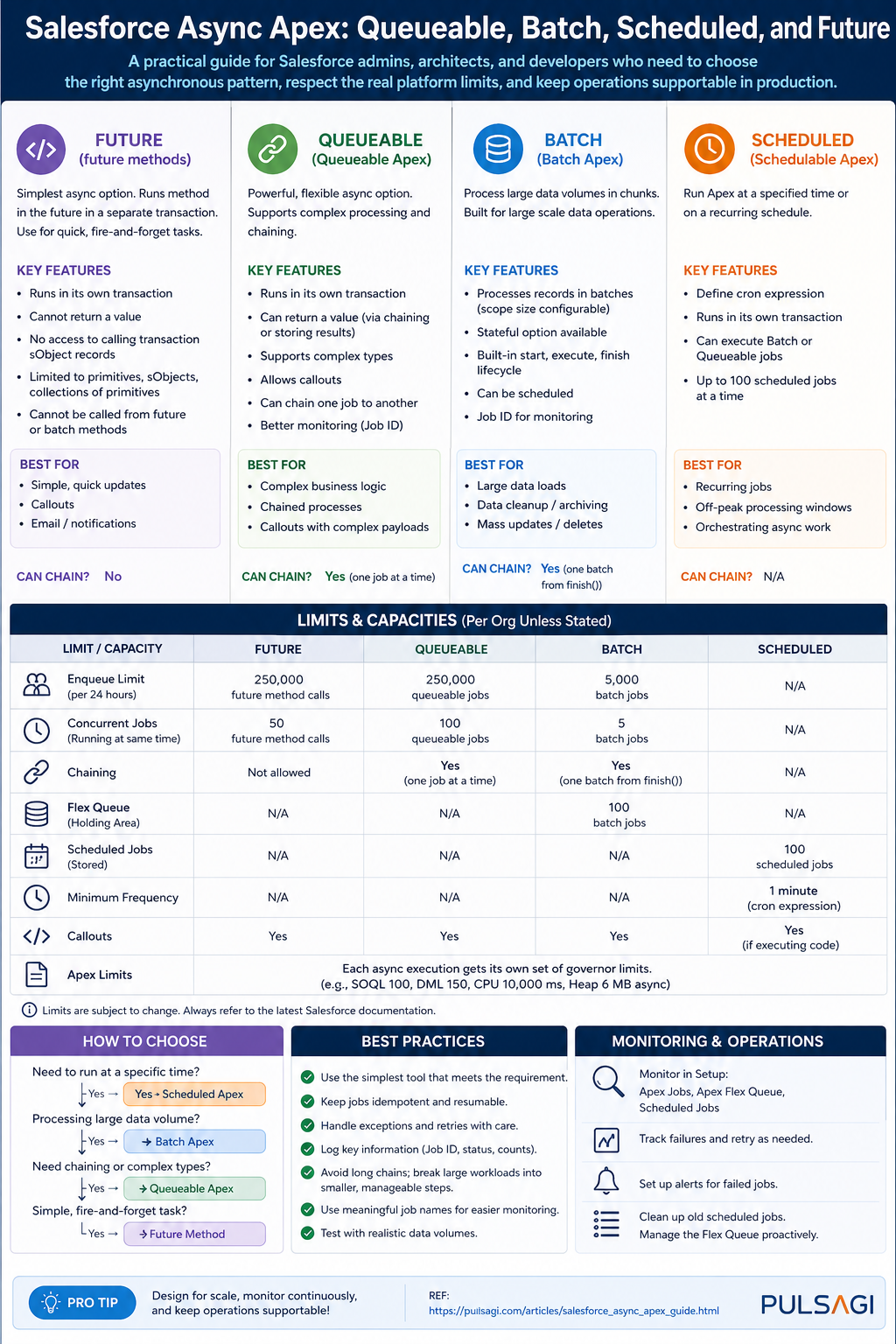
For current Salesforce best practice, the primary async Apex models are Queueable, Batch, and Scheduled. Future methods still exist, but Salesforce's own developer guidance no longer recommends them for new production implementations when Queueable can do the job better.
How to choose the right pattern
The fastest way to choose the right async approach is to ask four questions. How large is the data set? Does the job need a clock-based schedule? Do you need job chaining or richer state passing? Does operations need a simple native lifecycle or more custom orchestration control?
Choose Queueable when
- The job is a bounded unit of work.
- You want to pass structured state into the job.
- You need chaining, retries, or callout orchestration.
- You want the modern default for one-off async processing.
Choose Batch when
- You are traversing very large record volumes.
- You want Salesforce-managed chunking and per-scope transactions.
- You need a native
start,execute,finishlifecycle. - Support teams are already comfortable with batch monitoring.
Choose Scheduled when
- The trigger for work is time-based.
- You need a nightly, hourly, or cron-driven dispatcher.
- You want to launch Queueable or Batch at controlled times.
- The business process is recurring rather than event-driven.
Use Future only when
- You are maintaining legacy code.
- A very small primitive-only async method already exists and works.
- Refactoring risk is higher than the immediate business value.
- You fully accept the narrower feature set and monitoring limitations.
Queueable Apex
Queueable Apex is the best default choice for most new async Apex development. It supports a class-based model, gives you a job ID for monitoring, allows structured data to be passed into the job, and works cleanly for chaining, callouts, and orchestration-driven logic.
From a developer perspective, Queueable is easier to reason about than Batch when the workload is already bounded. From an admin perspective, it is easier to explain than Future because the job can be monitored in AsyncApexJob and Setup. This observability alone is a major operational advantage.
Best use cases
- Post-save integration callouts.
- Enrichment or scoring after record creation.
- Orderly chained processing steps.
- Retry-friendly business operations.
Key limitations
- Still subject to normal transaction limits inside each job.
- Large-record traversal is not its natural strength without extra design.
- Only one Queueable can be enqueued from an already-async transaction.
- You own completion, retry, and failure orchestration logic.
public class InvoiceSyncQueueable implements Queueable, Database.AllowsCallouts {
    private Set<Id> invoiceIds;
    private String correlationId;

    public InvoiceSyncQueueable(Set<Id> invoiceIds, String correlationId) {
        this.invoiceIds = invoiceIds;
        this.correlationId = correlationId;
    }

    public void execute(QueueableContext context) {
        List<Invoice__c> invoices = [
            SELECT Id, Name, External_Id__c, Status__c
            FROM Invoice__c
            WHERE Id IN :invoiceIds
        ];

        // Build request payload, call external service, update sync status.
        // Persist correlationId and the queueable job id for support visibility.
    }
}
The most important Queueable limit to remember is architectural, not syntactic: up to 50 jobs can be enqueued in a synchronous transaction, but only one additional Queueable can be enqueued once you are already inside an asynchronous transaction. That is why good Queueable design uses batching of input IDs, not one job per record.
There is also a current design nuance worth noting. As of Spring '26, Apex Cursors are GA in API v66.0, and Salesforce explicitly positions cursors plus chained Queueable jobs as a strong alternative for some large-volume scenarios that previously defaulted to Batch Apex. That does not replace Batch across the board, but it does widen what Queueable can handle well when you need more control over chunk size and progression.
Batch Apex
Batch Apex is still the most natural fit for true large-volume processing. It breaks work into scopes, runs each scope in a separate transaction, and provides the cleanest native lifecycle for bulk background processing. When a team says, "We need to recalculate, clean up, archive, or update a very large data set," Batch is usually still the first thing to evaluate.
Its biggest strength is that Salesforce manages the chunking model for you. Each execute scope gets its own transaction and therefore its own transaction-level governor budget. That makes Batch far more forgiving than trying to brute-force a huge data set through one Queueable job.
Best use cases
- Nightly recalculation or cleanup jobs.
- Archive and retention processes.
- Mass backfills and bulk transformations.
- Jobs where each record is processed similarly.
Key limitations
- Higher framework overhead than Queueable.
- Less elegant for orchestration-heavy or branching logic.
- Only five active batch jobs can run concurrently.
- The flex queue is finite, so runaway scheduling creates backlog risk.
global class AccountTierRecalcBatch implements Database.Batchable<SObject> {
    global Database.QueryLocator start(Database.BatchableContext bc) {
        return Database.getQueryLocator([
            SELECT Id, AnnualRevenue, Customer_Tier__c
            FROM Account
            WHERE IsActive__c = true
        ]);
    }

    global void execute(Database.BatchableContext bc, List<Account> scope) {
        for (Account acc : scope) {
            if (acc.AnnualRevenue == null) {
                acc.Customer_Tier__c = 'Standard';
            } else if (acc.AnnualRevenue >= 10000000) {
                acc.Customer_Tier__c = 'Strategic';
            } else {
                acc.Customer_Tier__c = 'Growth';
            }
        }

        if (!scope.isEmpty()) {
            update scope;
        }
    }

    global void finish(Database.BatchableContext bc) {
        System.debug('AccountTierRecalcBatch completed');
    }
}
For limitations, the most important number is that a Database.QueryLocator in Batch can traverse up to 50 million records, which is why Batch remains so strong for very large data sets. Operationally, official Salesforce developer guidance also highlights that only five batch jobs can be actively processing at once, with a maximum of 100 waiting jobs in the flex queue. That is manageable in a disciplined org and painful in an org that schedules everything blindly.
From an admin perspective, Batch becomes risky when too many unrelated jobs are launched on the same schedule window. From a developer perspective, Batch becomes risky when teams use it for low-volume work just because it feels "safer," even though the framework overhead is unnecessary.
Scheduled Apex
Scheduled Apex is about when work should start, not about being the best engine for all the work itself. The cleanest mental model is to treat Scheduled Apex as a dispatcher. If the job is simple, it may execute directly. If the work is large or integration-heavy, the scheduled job should usually launch a Queueable or Batch process.
This distinction matters in real delivery. Admins tend to think in business windows such as hourly syncs, nightly reconciliations, or month-end rollups. Developers tend to think in frameworks. Scheduled Apex is where those two perspectives meet: the schedule belongs to operations, while the downstream execution pattern belongs to architecture.
Best use cases
- Nightly dispatch of a batch job.
- Hourly queueable dispatch for integration polling.
- Recurring maintenance or housekeeping tasks.
- Time-based orchestration that Flow cannot own cleanly.
Key limitations
- It adds cron management and operational ownership.
- Too many scheduled jobs create queue noise and hidden coupling.
- It should not become a substitute for event-driven design.
- It consumes the shared daily asynchronous execution budget.
global class NightlyRevenueScheduler implements Schedulable {
    global void execute(SchedulableContext sc) {
        Database.executeBatch(new AccountTierRecalcBatch(), 200);
    }

    public static void scheduleNightlyJob() {
        System.schedule(
            'Nightly Revenue Recalculation',
            '0 0 1 * * ?',
            new NightlyRevenueScheduler()
        );
    }
}
Salesforce's consolidated async limit model is especially relevant here. Scheduled executions count against the same shared asynchronous execution pool as other async Apex types. That means a badly designed schedule strategy does not just affect one job. It can consume capacity needed by Queueable, Batch, and Future work elsewhere in the org.
The practical recommendation is simple: schedule less, dispatch smarter, and prefer a single orchestrated nightly job over dozens of overlapping schedules with overlapping ownership.
Future methods
Future methods are the legacy async Apex tool. They are easy to write, but that simplicity hides meaningful constraints. You can only pass primitive data types or collections of primitives, you do not get the same rich class-based execution model as Queueable, and the operational story is weaker for modern enterprise work.
Salesforce's own developer guidance is now clear on this point: if you are building new production-grade async Apex, prefer Queueable over Future unless there is a very narrow reason not to. Future still exists, but it is no longer the preferred architecture choice.
Best use cases
- Very small legacy async operations.
- Low-risk refactor deferral in mature codebases.
- Simple primitive-only fire-and-forget work.
Key limitations
- No complex object arguments such as sObjects.
- No class-based state model like Queueable.
- Not the recommended pattern for new production work.
- Architecturally weaker for orchestration and observability.
public class LegacyCaseNotifier {
    @future(callout=true)
    public static void notifyExternalSystem(Set<Id> caseIds) {
        List<Case> closedCases = [
            SELECT Id, CaseNumber, Status
            FROM Case
            WHERE Id IN :caseIds
        ];

        // Build payload and make callout to legacy integration endpoint.
    }
}
The important governor detail is that a single transaction can invoke only a limited number of future calls, and the org-wide asynchronous execution pool is shared across async types. That is why firing one future call per record is such a classic anti-pattern. If you still maintain Future code, batch the identifiers and make one bulk-safe invocation per transaction whenever possible.
Admin and operations perspective
Async design is not finished when the code compiles. Someone has to operate it. In most Salesforce teams, that operator is not the original developer. It is an admin, support lead, release manager, or platform owner looking at Setup after a failure. That makes observability a first-class requirement, not a luxury.
What admins should monitor
- Apex Jobs for Queueable, Batch, and Future execution status.
- Scheduled Jobs for cron-driven work and schedule sprawl.
- Flex Queue for waiting batch backlog.
- Failure trends, long runtimes, and overlapping jobs.
What developers should build in
- Correlation IDs or business job IDs.
- Custom logging for critical business failures.
- Idempotent reprocessing behavior.
- Support-friendly status storage on custom objects when the process matters to the business.
// Example monitoring query for recent async failures
List<AsyncApexJob> failedJobs = [
    SELECT Id, JobType, ApexClass.Name, Status, NumberOfErrors, CreatedDate
    FROM AsyncApexJob
    WHERE Status IN ('Failed', 'Aborted')
    ORDER BY CreatedDate DESC
    LIMIT 50
];
A strong admin-developer operating model usually looks like this: admins own schedule hygiene, failure triage, and business communication; developers own bulk safety, error handling, and diagnostic detail. If either side is missing, async reliability drops fast.
Limits and limitations table
The table below summarizes the most important practical limits and caveats. A few numeric limits can evolve by release, so teams should always recheck the official Apex limits reference when planning a high-volume implementation. The points below are based on current official Salesforce documentation and developer guidance as of April 26, 2026.
| Async type | What it is best at | Important limits | Main limitations |
|---|---|---|---|
| Queueable Apex | Bounded async work, chaining, callouts, orchestration. | Up to 50 enqueues in one synchronous transaction; only 1 enqueue from an already-async transaction. | Not naturally ideal for very large record traversal without extra design such as cursor-based chunking. |
| Batch Apex | Very large record volumes and framework-managed chunking. | QueryLocator can traverse up to 50 million records; only 5 active batch jobs at a time; flex queue max 100. |
Higher overhead, slower startup, and less elegant for orchestration-heavy logic. |
| Scheduled Apex | Time-based dispatch and recurring jobs. | Consumes the shared org-wide asynchronous execution budget; active scheduled-job count is finite. | Easy to overuse, easy to duplicate, and often misapplied where event-driven design would be cleaner. |
| Future methods | Small legacy fire-and-forget work. | Only primitive or primitive-collection arguments; shares the same org-wide async execution pool. | Weaker monitoring, weaker extensibility, and not recommended for new production implementations. |
250,000 executions or 200 times the number of qualifying user licenses, whichever is greater.
Best practices
- Choose async for business reasons, not as a reflex. If synchronous logic can be made efficient and still satisfies the user experience, prefer the simpler architecture.
- Bulkify the entry point. Whether you use Queueable, Future, or Batch, collect IDs and process sets, not one record per job.
- Use Queueable as the default for new one-off async work. It is the most balanced option for modern implementations.
- Use Batch when the data set is truly large. Do not fight the platform if the workload is clearly bulk-oriented.
- Use Scheduled Apex as an orchestrator. Let it launch the right worker rather than owning every heavy step itself.
- Avoid new Future-based designs. Keep Future for legacy compatibility, not for fresh architecture.
- Persist operational evidence. If the process matters to the business, store job outcome, correlation ID, timestamps, and retry state somewhere support can use.
- Design for idempotency. Async retries and partial failures happen. Reprocessing should not create duplicate side effects.
- Control schedule sprawl. Too many cron jobs create invisible coupling and shared-capacity risk.
- Test with realistic volume. A passing unit test with five records proves correctness, not production readiness.
Recommendation
If you want one practical rule set, use this. For new development, start with Queueable Apex. If the work is very large-volume, move to Batch Apex. If the process is time-driven, use Scheduled Apex to dispatch the real worker. Treat Future methods as a legacy compatibility tool, not a preferred design pattern.
For admins, the recommendation is to govern schedules and monitor queue health. For developers, the recommendation is to build async logic that is bulk-safe, idempotent, and supportable. The right async solution is not the one that merely runs in the background. It is the one that your team can still explain, monitor, and recover six months after go-live.
References
This article was checked against Salesforce's official Apex documentation and Salesforce Developers blog guidance current as of April 26, 2026. Where newer guidance affects interpretation, such as the recommendation to prefer Queueable over Future or the addition of Apex Cursors in Spring '26, those points are called out explicitly.
- Asynchronous Apex - Apex Developer Guide
- Queueable Apex - Apex Developer Guide
- Batch Apex - Apex Developer Guide
- Future Methods - Apex Developer Guide
- Execution Governors and Limits - Salesforce Limits Quick Reference
- Leveling Up Your Apex Skills - Salesforce Developers Blog
- Exploring A Combined Async Apex Framework - Salesforce Developers Blog
- Apex Cursors - Apex Developer Guide
- The Salesforce Developer's Guide to the Spring '26 Release
- Drive Consistency and Grow Developer Skills with a Developer Best Practices Checklist