
Introduction
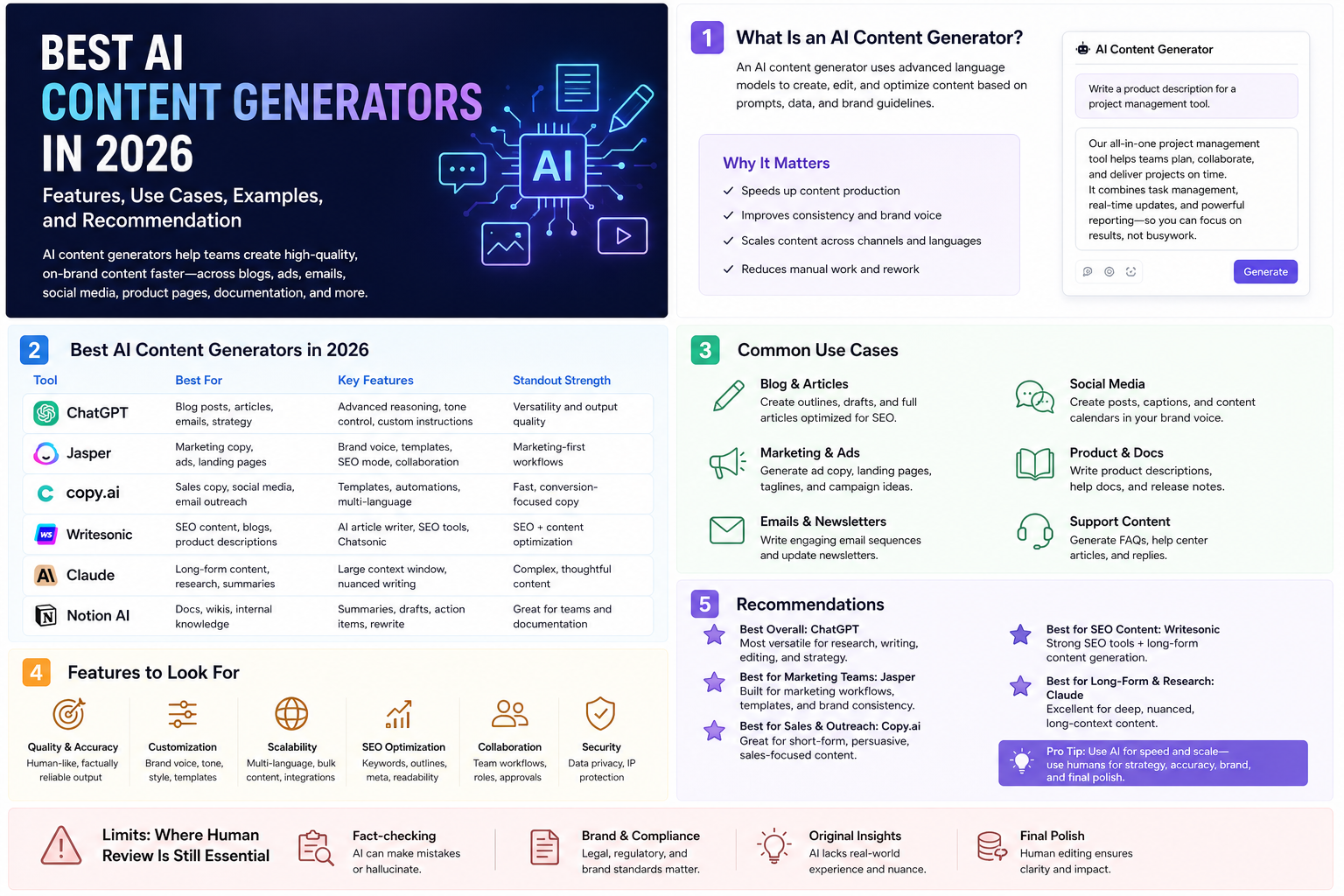
An AI content generator is a tool that uses generative AI to draft, rewrite, expand, summarize, personalize, or repurpose written content. In practice, the category now spans much more than article writing. Teams use these tools for blog posts, landing pages, product descriptions, ad copy, campaign briefs, FAQs, email sequences, knowledge articles, and internal documentation.
This article was reviewed against official product pages and official help documentation available on February 4, 2026. The goal is practical guidance, not hype. If you want one short answer, the best overall AI content generator for most users is ChatGPT, but marketing teams that need tighter brand controls may prefer Jasper or Writer.
What an AI content generator is
At a basic level, an AI content generator takes an instruction plus optional context and produces draft content. Better tools do more than that. They remember brand rules, adapt tone, transform one source asset into many deliverables, and help teams run repeatable workflows instead of isolated prompts.
| Element | What it means | Why it matters |
|---|---|---|
| Prompted generation | The tool drafts text from a user request such as "write a product launch email." | Good for speed, brainstorming, and zero-to-one drafting. |
| Rewriting | The tool reshapes existing text for tone, length, clarity, or format. | Useful when you already have source material and want faster refinement. |
| Repurposing | One source, such as a webinar transcript or product brief, becomes many outputs. | This is where teams often get the biggest productivity gains. |
| Brand grounding | The system applies voice, style, terminology, and sometimes approved knowledge. | Critical for organizations that care about consistency and review time. |
| Workflow automation | Content creation is turned into reusable steps rather than one-off prompting. | Important for scale, governance, and team repeatability. |
Why AI content generators matter
Content operations are rarely blocked by the final sentence alone. Teams lose time on first drafts, derivative versions, approvals, rewriting, and format conversion. AI content generators matter because they compress those repetitive steps.
Faster first drafts
Blank-page time drops sharply when the tool can create a workable initial structure.
More derivative output
One source can become blog copy, social snippets, email text, ad hooks, and FAQ entries.
Better consistency
Brand voice, terminology, and format rules can be applied more consistently across teams.
Less low-value rewriting
Teams spend less time manually shortening, expanding, or adapting the same message repeatedly.
Business reality: the real value is not "the AI wrote a paragraph." The real value is that a team can move from source context to many usable content assets faster, with fewer review loops and clearer operational control.
Key features to look for
If you are comparing AI content generators, these are the features that matter most in real usage.
Brand voice and style rules
Look for ways to encode tone, terminology, banned phrases, and style guidance so the output does not feel generic.
Source grounding
Tools grounded in trusted documents or company knowledge usually produce more reliable business content.
Rewrite controls
The ability to shorten, expand, simplify, localize, summarize, and restructure content is often more valuable than raw drafting.
Workflow repeatability
Templates, campaigns, pipelines, or workflows matter if several people need the same process repeatedly.
Team governance
Admins should care about workspace defaults, user roles, approvals, auditability, and access controls.
Integration fit
Developers and operations teams should look for API, automation, extension, or connected-system support.
Quick answer: which AI content generator is best for what
If you want a fast selection guide, start here.
| Tool | Best for | Why it stands out | Watch out for |
|---|---|---|---|
| ChatGPT | Best overall AI content generator for most people and mixed workflows. | Strong general drafting, rewriting, summarization, research support, and multimodal help in one place. | Without strong inputs and review, outputs can still be generic or wrong. |
| Claude | Long-form writing, editorial revision, structured thought partnership. | Very strong for idea development, content refinement, and document-heavy collaboration. | Still needs verification and explicit constraints for business-critical output. |
| Jasper | Marketing teams that need brand governance and repeatable campaigns. | Brand Voice, style controls, agents, and content pipeline structure are built around marketing execution. | It is more specialized than a general assistant and may be more than individuals need. |
| Writer | Enterprise content operations with governance and company-data grounding. | Knowledge Graph, AI Studio, and IT-friendly governance make it attractive for controlled rollout. | Best value appears when governance and internal knowledge really matter. |
| Copy.ai | Repeatable go-to-market workflows and content process automation. | Workflows and brand voice support make it useful for scaled content operations. | It is strongest when you define process clearly rather than use it casually. |
| Canva Magic Write | Visual-first teams creating copy inside presentations, docs, and design workflows. | Fast draft generation inside the broader Canva content production experience. | Not the strongest choice for deep enterprise writing governance. |
| Grammarly | Polish, tone correction, rewrites, and final communication quality. | Excellent last-mile writing improvement across many apps. | It is more of a writing assistant and editor than a full content operating system. |
Best AI content generators
The list below is not just "popular AI tools." These are the most useful AI content generator options for distinct content jobs.
ChatGPT
What it is: ChatGPT is a general-purpose conversational AI assistant that can draft, rewrite, summarize, brainstorm, analyze files, and help create content across many formats.
Why it matters: OpenAI's official capabilities overview highlights drafting, rewriting, summarizing, creative suggestions, file work, web-backed research, and collaborative writing surfaces such as Canvas. That breadth makes ChatGPT the safest default choice for most individuals and small teams.
Key features
- Drafting, rewriting, and summarization.
- File-aware content work for documents and notes.
- Research support with web-backed workflows.
- Flexible tone and format adaptation.
- Useful for both one-off tasks and longer projects.
Best use cases
- Blog outlines and first drafts.
- Product page and landing page copy.
- Email sequences and FAQ generation.
- Transcript-to-article conversion.
- Technical and business content mixed in one workflow.
Developer perspective: ChatGPT is especially useful when content creation overlaps with structured work such as API docs, release notes, changelogs, prompt templates, and developer-facing knowledge content.
Admin perspective: as soon as a team uses ChatGPT repeatedly for business content, admins should define what data is allowed, which workspace features are approved, and what human review checkpoints remain mandatory.
Limitations: ChatGPT is broad rather than specialized. It can still produce plausible but incorrect content and often needs stronger voice control than marketing-specific platforms provide.
Claude
What it is: Anthropic positions Claude for writers as a collaborative writing tool that helps develop ideas, polish content, and support research-heavy writing work.
Why it matters: Claude often feels strong when the task is not just "generate text" but "help me think through structure, tone, and clarity without flattening the voice."
Key features
- Idea development and outlining support.
- Editorial feedback and clarity improvement.
- Strong help with structure and narrative flow.
- Research-oriented writing guidance.
- Useful for refining authentic voice instead of replacing it.
Best use cases
- Long-form articles and essays.
- Thought leadership drafts.
- Policy, strategy, and narrative documents.
- Editorial revision passes.
- Writers who want collaborative feedback more than canned templates.
Developer perspective: Claude is useful when technical teams need design docs, architecture narratives, RFC-style writing, and careful revision of stakeholder-facing material.
Admin perspective: Claude is a good fit for teams whose bottleneck is document quality and reasoning, but it still needs organizational guidance around source validation and confidential content handling.
Limitations: Claude is not primarily a campaign operating system. If your biggest problem is scaled marketing production with brand governance, Jasper or Writer may fit better.
Jasper
What it is: Jasper is now positioned as a marketing-focused AI platform with agents, content pipelines, governance, brand voice, visual guidelines, and style guidance built around executing marketing work at scale.
Why it matters: Jasper is one of the clearest answers when people ask for the best AI content generator specifically for marketing operations rather than for general AI chat.
Key features
- Brand Voice tuned from text, files, or URLs.
- Default workspace voice support for standardization.
- Agents and content pipelines for repeatable execution.
- Marketing-oriented governance and style controls.
- Support for campaign-level content generation.
Best use cases
- Multi-channel campaign copy.
- Blog plus social plus email derivative sets.
- Large teams that want standardized voice rules.
- Marketing ops that need less review churn.
- Teams creating high volumes of promotional content.
Developer perspective: Jasper matters to developers mainly when they support marketing systems, content pipelines, CMS automation, or team workflow integration rather than direct engineering writing.
Admin perspective: Jasper's strength is that workspace defaults, brand settings, and structured marketing workflows are first-class concerns instead of afterthoughts. That usually reduces tone drift across teams.
Limitations: Jasper is more specialized than ChatGPT or Claude. For teams that mostly need broad knowledge work or mixed business tasks, it may be too focused on marketing workflow.
Writer
What it is: Writer is an enterprise AI platform oriented around governed agents, Knowledge Graph grounding, AI Studio, and organization-level control.
Why it matters: Writer stands out when content generation must be tied closely to internal knowledge, operational control, and IT-friendly rollout instead of ad hoc prompting.
Key features
- Knowledge Graph for grounded content generation.
- AI Studio for building governed agent workflows.
- Style guide support for organization-wide writing standards.
- Admin controls and deployment supervision.
- Multiple paths for no-code and API-driven implementation.
Best use cases
- Content tied to internal policies or product knowledge.
- Regulated or compliance-sensitive organizations.
- Knowledge-heavy support and enablement content.
- Internal agents that generate approved business writing.
- Cross-functional enterprise AI rollouts.
Developer perspective: Writer is attractive when teams want to connect retrieval, custom agents, and internal systems into a governed content pipeline rather than rely only on a chat surface.
Admin perspective: Writer is one of the strongest options when IT wants visibility, control, and policy alignment while business teams still want usable content generation.
Limitations: Writer can be more platform-heavy than a single user needs. Its value becomes clearer in team, governance, and data-grounding scenarios.
Copy.ai
What it is: Copy.ai combines brand voice support with workflow-based content generation, letting teams chain together AI and procedural steps for scalable output.
Why it matters: Content generation becomes more reliable when the process itself is reusable. Copy.ai's workflow emphasis is helpful for teams that want automation rather than just chat.
Key features
- Brand Voice based on existing content.
- Workflow steps for repeatable content processes.
- Ability to move beyond one-off prompting.
- Useful for multi-step GTM execution.
- Supports scaling a process across many runs.
Best use cases
- Outbound sequences and sales collateral variants.
- Repeatable social and campaign production flows.
- Teams standardizing a content generation process.
- Operational marketing environments.
- Workflow-driven derivative content creation.
Developer perspective: Copy.ai is relevant when the challenge is integrating content generation into repeated operational steps instead of freeform ideation.
Admin perspective: a workflow-first tool is useful for governance because it narrows how the system is used and makes output behavior more standardized.
Limitations: Copy.ai is strongest when there is a defined recurring process. If the work is highly exploratory or research-heavy, ChatGPT or Claude can feel more flexible.
Canva Magic Write
What it is: Canva's Magic Write is an AI-powered writing assistant inside Canva's broader content and design environment. Canva says it can generate drafts across document types, rewrite text, summarize, and apply brand voice.
Why it matters: Canva is valuable when written content and visual production happen together. A lot of business content is not just text. It becomes a presentation, social post, one-pager, or visual doc immediately afterward.
Key features
- Draft generation directly inside Canva workflows.
- Rewrite, summarize, and paraphrase support.
- Brand voice support for team consistency.
- Works naturally with presentations and visual assets.
- Fast for social, proposal, and design-adjacent content.
Best use cases
- Presentation copy and slide narratives.
- Social posts paired with design assets.
- Simple marketing docs and one-pagers.
- Content teams working visually from the start.
- Small businesses that want one simple workspace.
Developer perspective: Canva is less about engineering writing depth and more about content production speed in visual workflows.
Admin perspective: Canva works well when brand and design operations already live there. The tradeoff is that it is not a deep knowledge-grounded enterprise writing platform.
Limitations: it is great for speed and convenience, but not the top choice for deep research-backed or policy-sensitive writing workflows.
Grammarly
What it is: Grammarly is an AI writing assistant focused on idea support, rewrites, tone, clarity, proofreading, and on-brand communication across a very wide app surface.
Why it matters: A lot of teams do not need a pure generator as much as they need better content finishing. Grammarly is strongest when the real pain is weak phrasing, inconsistent tone, and messy last-mile communication.
Key features
- Prompt-based drafting and outlining.
- Tone, length, and formality rewrites.
- Style guides and on-brand suggestions.
- Wide app coverage across everyday work tools.
- Proofreading plus AI-assisted improvement.
Best use cases
- Email and proposal improvement.
- Editing AI-generated drafts before publishing.
- Improving clarity in support and knowledge content.
- Helping teams write faster without lowering quality.
- Adding polish across many applications.
Developer perspective: Grammarly is useful for technical teams that produce architecture docs, support replies, release notes, and customer communication but do not want to leave their existing tools.
Admin perspective: Grammarly becomes powerful at scale when style guides, brand tones, and governance are set centrally instead of left to individual habits.
Limitations: Grammarly is not the best answer for deep content strategy or complex grounded generation. It is strongest as an enhancer and editor.
Many practical examples
The fastest way to understand an AI content generator is to see what a good workflow looks like in practice.
Turn a product brief into a blog outline
Use this product brief to create a blog outline for operations leaders.
Audience: mid-market SaaS operations teams.
Goal: explain the business problem, the solution, and the rollout path.
Tone: practical, confident, not hype-heavy.
Return: title options, meta description, H2 outline, and a 150-word intro.
This is a good first-pass prompt for ChatGPT, Claude, Jasper, or Writer. It defines audience, goal, tone, and output format clearly.
Turn one webinar transcript into many outputs
Use this webinar transcript as the source of truth.
Create:
1. a 700-word blog post
2. 5 LinkedIn posts
3. a customer email summary
4. 8 FAQ questions with answers
Keep terminology consistent with the original transcript.
Flag any claims that should be verified before publication.
This is where AI content generators create real leverage. The value is not only the blog. It is the derivative set from one source.
Create a knowledge article plus support macro
Write a customer-facing help article explaining how to reset two-factor authentication.
Then write:
- a short support ticket response
- an internal agent note
- a 5-step checklist version
Tone: calm and precise.
Do not invent UI labels if they are not in the notes provided.
This is a strong example for Writer or ChatGPT when the content must match approved operational language.
Rewrite generic copy into brand voice
Rewrite this landing page section in our brand voice.
Voice rules:
- clear and warm
- no buzzwords
- no exclamation marks
- keep sentences short
- prefer "teams" over "organizations"
Return two versions:
1. executive-friendly
2. practitioner-friendly
This is the kind of task where Jasper, Writer, Copy.ai, and Grammarly become especially useful if voice controls are already configured.
Generate persona-specific collateral
From this source deck, create:
- a one-page value summary for CFOs
- a shorter version for IT admins
- 3 objection-handling responses for sales
- a 60-second talk track for an AE
Keep the core message consistent but adapt the language to each audience.
This is one of the most practical team use cases because it turns one approved source into role-specific communication.
Create release notes from engineering input
Use these merged PR summaries and issue notes to draft release notes.
Organize by:
- new features
- bug fixes
- security changes
- migration notes
Write for external technical users.
Avoid internal-only implementation details unless they affect adoption.
This is a strong mixed admin and developer use case because the content is technical, structured, and outward-facing.
Create a search-friendly article skeleton
Create an SEO-friendly article structure for the keyword "AI content generator".
Include:
- 5 title options
- meta description
- search intent summary
- H2 and H3 structure
- FAQ section
- internal linking ideas
Do not stuff the keyword unnaturally.
AI can help with structure and coverage, but search performance still depends on originality, depth, evidence, and editing quality.
Ask the model to critique its own draft
Review the draft you just created.
Identify:
- generic sections
- unsupported claims
- places where the tone feels off-brand
- areas that need stronger examples
Then suggest exact improvements without rewriting the whole article yet.
A structured self-review step often improves output more than asking for a longer first draft.
Admin and developer perspective
Most content-generator comparisons stop at writing quality. That is not enough for real teams. Admins and developers care about operational fit, not only draft fluency.
| Role | What matters most | Good fit | Practical advice |
|---|---|---|---|
| Business admin / IT admin | Workspace controls, approved knowledge, roles, review process, and policy alignment. | Writer or Jasper for governed rollout; Grammarly for communication quality layers. | Do not buy on output quality alone. Evaluate defaults, guardrails, auditability, and data policy. |
| Developer / platform engineer | APIs, automation paths, CMS integration, content pipelines, and reuse of source data. | ChatGPT for broad utility; Writer for governed internal agents; Jasper or Copy.ai for marketing automation support. | Treat content generation as a system problem. Source inputs, approval states, and publishing targets matter as much as the model. |
| Marketing lead | Brand consistency, campaign throughput, derivative assets, and reduced review cycles. | Jasper first; Copy.ai and Canva for workflow-specific needs. | Choose the tool that matches your content operating model, not the one with the flashiest demo. |
| Support / enablement team | Fast article drafting, macro generation, terminology consistency, and safe knowledge use. | Writer, ChatGPT, or Grammarly depending on governance level and workflow depth. | Keep approved source material central and train teams to distinguish draft generation from factual approval. |
Best practices
- Start from source material: briefs, transcripts, product notes, and approved docs usually produce better output than bare prompts.
- Separate drafting from approval: generation can be automated, but sign-off should remain explicit.
- Define brand rules once: tone, terminology, banned claims, and formatting rules should not be retyped for every task.
- Use derivative workflows: the highest ROI often comes from converting one source into many channel-specific outputs.
- Keep examples close to the prompt: showing the format you want often improves consistency quickly.
- Ask for self-critique: a second pass that checks for unsupported claims, repetition, and tone drift often improves quality significantly.
- Measure edit distance: if humans must rewrite everything, your workflow design is weak even if the model sounds fluent.
- Document approved usage: teams should know what can be shared, which tools are approved, and when human review is mandatory.
Limitations
Even the best AI content generator still has real boundaries.
- Factual risk remains: models can still invent details, citations, product claims, or workflow steps.
- Generic output is common: without strong context, content may sound smooth but forgettable.
- Brand fit is not automatic: many tools need explicit voice setup before the writing feels truly on-brand.
- Governance does not happen by magic: admins still need rules for data handling, approvals, and user access.
- SEO is not guaranteed: ranking depends on originality, authority, internal linking, intent match, and post-publication performance, not just keyword insertion.
- Workflow quality matters more than model worship: poor inputs and unclear approval logic will produce mediocre content on any platform.
Recommendation
If you want one simple recommendation, use ChatGPT as your default AI content generator unless you have a more specialized need.
Choose Claude when writing quality, structure, and editorial collaboration matter more than campaign automation. Choose Jasper if your core problem is on-brand marketing production at scale. Choose Writer if governance, internal knowledge grounding, and IT-friendly rollout are the real priorities. Choose Copy.ai when repeatable GTM workflows are the main goal. Choose Canva Magic Write if copy creation lives inside a visual production process. Keep Grammarly as the final polish layer if communication quality is a persistent bottleneck.
For most organizations, the best setup is not one magical tool doing everything. It is a small, approved stack with clear ownership: one general generator, one specialist workflow layer if needed, and a human review process that protects quality.