
Introduction
Salesforce Apex security comparison of USER_MODE, SECURITY_ENFORCED, and stripInaccessible, including CRUD, FLS, sharing, DML, and use-case tradeoffs. explicitly enforced user-context access. In Summer '26 release notes for API version 67.0, Salesforce signals a major shift: Apex database operations move to user mode by default, classes enforce sharing by default, and triggers remain the important exception because they still run in system mode. That is exactly why teams still need to compare WITH SECURITY_ENFORCED, Security.stripInaccessible(), and WITH USER_MODE.
All three are valid security tools. The mistake is treating them as interchangeable. They solve different problems, fail differently, and fit different architecture choices. Some fail immediately when access is missing. Some sanitize data and keep going. Some enforce sharing, and some do not.
WITH SECURITY_ENFORCED is removed, and Apex triggers still run in system mode. Because Apex behavior is versioned, older classes can still behave differently until upgraded.
stripInaccessible() when graceful degradation is a requirement, and treat WITH SECURITY_ENFORCED mainly as a legacy pre-67 pattern rather than a forward-looking recommendation.
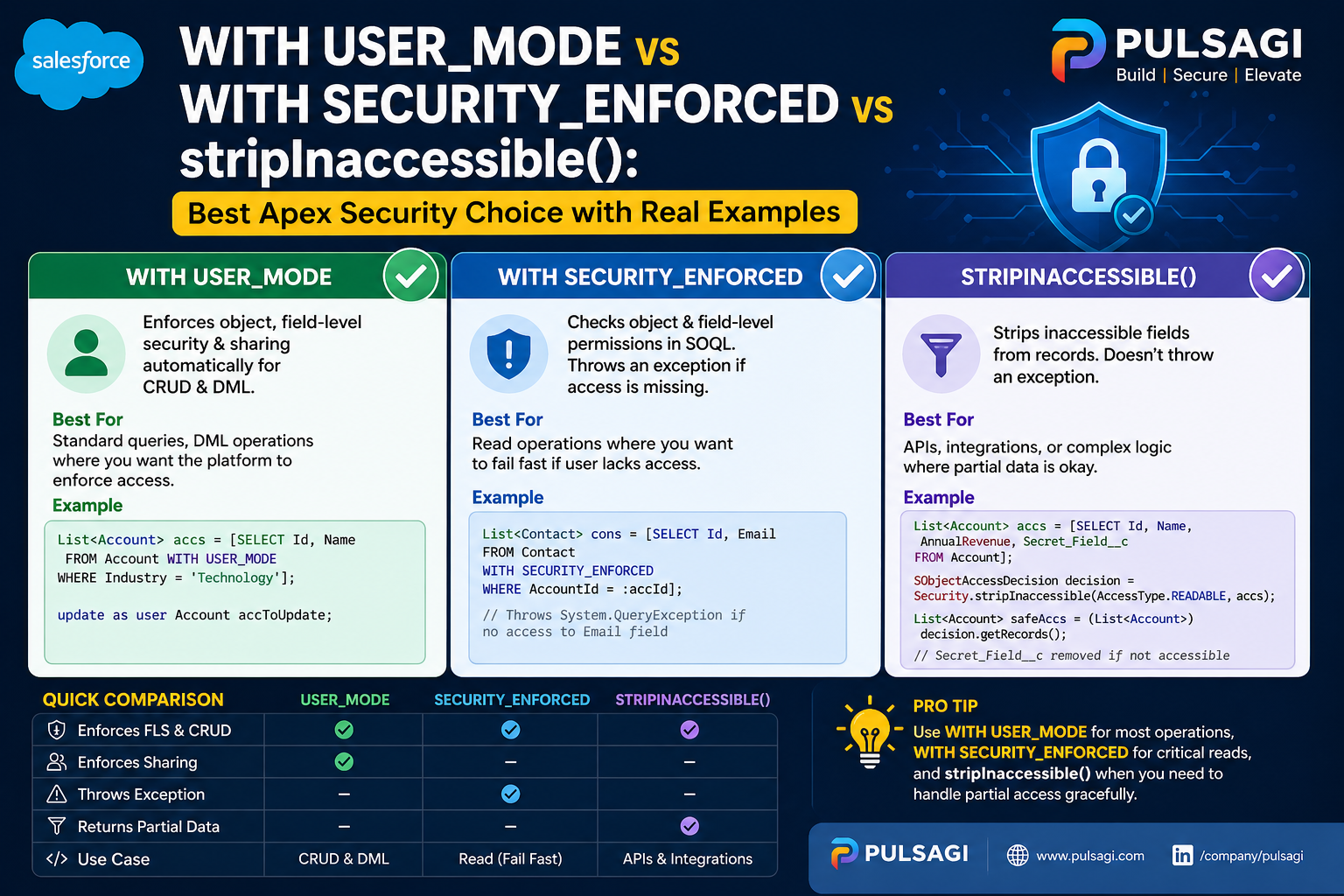
What each option actually is
WITH SECURITY_ENFORCED
A SOQL clause that checks object- and field-level read access for fields returned by the query. If access is missing, the query throws an exception instead of returning data.
Security.stripInaccessible()
An Apex method that removes fields the user should not access from queried records, records headed for DML, or deserialized payloads. It is the graceful-degradation option.
WITH USER_MODE
A modern access mode for SOQL, SOSL, and DML that makes the database operation behave in the user's security context, including sharing, CRUD, and field-level security.
If you want the full standalone deep dives, this comparison pairs well with the site's dedicated guides for WITH SECURITY_ENFORCED, stripInaccessible(), and WITH USER_MODE.
Why this comparison matters
This comparison matters because secure Apex is no longer just a developer concern. Admins configure the permission model. Architects decide whether a service should fail fast or degrade gracefully. Security reviewers need clear evidence that CRUD, FLS, and sharing were not forgotten. Teams using AI code assistants need patterns that are easy to audit in pull requests.
That last point is especially important now. AI-generated Apex often looks syntactically correct while quietly defaulting back to system-mode behavior. Inline patterns such as WITH USER_MODE or a deliberate stripInaccessible() call make secure intent much easier to review than large blocks of describe-check boilerplate.
Technical comparison table
| Feature | WITH SECURITY_ENFORCED | stripInaccessible() | WITH USER_MODE |
|---|---|---|---|
| Type | SOQL clause | Apex method | SOQL, SOSL, and DML access mode |
| Status in API 67.0+ | Removed in Summer '26 release notes for Apex API 67.0. | Still available and still useful. | Still available, but often becomes explicit syntax for behavior that is already the default in version 67.0+ classes. |
| Action on no access | Throws exception | Removes inaccessible fields and relationship data from returned records | Throws exception |
| CRUD/FLS support | Yes, for secure read queries | Yes | Yes |
| Sharing rules | No, not by itself and now mainly relevant to older-version Apex. | No, not by itself and still depends on the surrounding execution context. | Yes, and API 67.0 release notes also say Apex classes enforce sharing by default. |
| DML support | No | Yes | Yes |
| Best fit | Legacy fail-fast read enforcement in pre-67 code that has not been modernized yet. | Graceful degradation, payload sanitization, and mixed-permission experiences. | Modern user-context reads, searches, and writes, especially in older versions where explicit intent still matters. |
| Main recommendation now | Do not choose this for new API 67.0+ work. | Keep using it whenever partial success is the right business behavior. | Think of it as the target security model; in API 67.0+ it becomes more about version awareness and explicitness than basic enablement. |
Important nuance: stripInaccessible() is not literally a record-sharing tool. It strips inaccessible fields from records you already queried or are about to write. Also, when root-object CRUD enforcement is enabled and object access is missing, it can still throw an exception. That is why it is more accurate to think of it as sanitize and continue where possible, not never fail. A second nuance is versioning: a class compiled on an older Apex version does not automatically behave like a new API 67.0 class until you actually move it to that version and test the impact.
WITH SECURITY_ENFORCED explained
WITH SECURITY_ENFORCED was a major improvement when it arrived because it gave Apex developers a compact way to reject read queries that returned fields the user should not see. If a selected field is not accessible, Salesforce throws a QueryException and no data is returned.
Its main limitation is scope. It is for SOQL reads, not DML. It also does not act as a complete record-security solution by itself because sharing behavior still depends on the surrounding execution context. In Summer '26 release notes for Apex API 67.0, Salesforce goes further and says this clause is removed. That makes it a legacy pattern teams should understand for maintenance, not a strategy to keep expanding.
WITH SECURITY_ENFORCED is a fail-fast read guardrail, not a full user-context database model.
stripInaccessible() explained
Security.stripInaccessible() is the best option when your business requirement is "enforce security, but do not blow up the entire flow for every inaccessible field." It gives you sanitized sObjects that can be safely returned or written with blocked fields removed.
This matters in user-facing pages, service APIs, bulk updates, integration payload processing, and AI-generated service code where the user experience benefits from partial success. It is also one of the cleanest tools for sanitizing deserialized data from an untrusted source before that data touches deeper business logic.
stripInaccessible() when graceful degradation is a feature, not a compromise.
WITH USER_MODE explained
WITH USER_MODE is Salesforce's modern direction for secure database operations. It is broader than WITH SECURITY_ENFORCED because it supports SOQL, SOSL, and DML, and it is stronger because it evaluates the operation in the user's access context rather than only checking selected fields on a query.
Salesforce's official secure Apex guidance and Spring '23 developer guidance pointed modern teams here first, and Summer '26 release notes push the model even further by making user mode the default for database operations in API 67.0. That changes the practical question from "should we adopt user mode?" to "which classes are still on older behavior, and where do triggers or other system-mode contexts still need explicit care?"
WITH USER_MODE.
Code examples
These examples are intentionally practical. They show where each pattern fits instead of pretending one tool should cover every security requirement.
1. WITH SECURITY_ENFORCED for a fail-fast read
This is the classic pattern for a secure read query that should stop immediately if the user lacks access to a requested field.
public with sharing class ExpenseDirectoryService {
    public static List<Expense__c> getSubmittedExpenses() {
        try {
            return [
                SELECT Id, Name, Amount__c, Status__c, Owner.Name
                FROM Expense__c
                WHERE Status__c = 'Submitted'
                WITH SECURITY_ENFORCED
                ORDER BY CreatedDate DESC
                LIMIT 50
            ];
        } catch (QueryException ex) {
            throw new AuraHandledException(
                'You do not have access to one or more requested fields.'
            );
        }
    }
}
This pattern is still respectable in legacy selectors. The tradeoff is strict failure and no write support.
2. stripInaccessible() for graceful degradation
Here the query can fetch the records first, then sanitize the response so restricted fields are removed instead of causing the whole request to fail.
public with sharing class ExpenseScreenService {
    public static List<Expense__c> getVisibleExpenses() {
        List<Expense__c> rawExpenses = [
            SELECT Id, Name, Amount__c, Internal_Notes__c, Owner.Name
            FROM Expense__c
            ORDER BY CreatedDate DESC
            LIMIT 50
        ];

        SObjectAccessDecision decision =
            Security.stripInaccessible(AccessType.READABLE, rawExpenses);

        return (List<Expense__c>) decision.getRecords();
    }
}
The same method is also useful before DML.
public with sharing class ContactImportService {
    public static void saveContacts(List<Contact> incomingContacts) {
        SObjectAccessDecision decision =
            Security.stripInaccessible(
                AccessType.UPDATABLE,
                incomingContacts
            );

        List<Contact> safeContacts = (List<Contact>) decision.getRecords();

        if (!safeContacts.isEmpty()) {
            update safeContacts;
        }
    }
}
3. WITH USER_MODE for modern secure reads and writes
This is the best fit when the action should behave exactly like the user.
public without sharing class InvoiceService {
    public static List<Invoice__c> getOpenInvoices() {
        return [
            SELECT Id, Name, Total__c, Status__c
            FROM Invoice__c
            WHERE Status__c = 'Open'
            WITH USER_MODE
            ORDER BY CreatedDate DESC
            LIMIT 50
        ];
    }

    public static void createInvoice(Invoice__c draftInvoice) {
        insert as user draftInvoice;
    }
}
The important detail is that the database operation itself runs in user mode. That means the security behavior is attached directly to the read or write path, not left to wishful thinking about the broader class context.
4. Dynamic query example with AccessLevel.USER_MODE
Dynamic SOQL is where many teams accidentally drop security. User mode still works there through the database API.
public with sharing class InvoiceSelector {
    public static List<SObject> findByStatus(String statusFilter) {
        String soql =
            'SELECT Id, Name, Status__c, Total__c ' +
            'FROM Invoice__c ' +
            'WHERE Status__c = :statusFilter';

        return Database.queryWithBinds(
            soql,
            new Map<String, Object>{ 'statusFilter' => statusFilter },
            AccessLevel.USER_MODE
        );
    }
}
Use cases and decision guide
Choose WITH SECURITY_ENFORCED when
- You are maintaining an older read-only selector that already uses fail-fast query behavior.
- You want a short-term upgrade from insecure SOQL without redesigning the service yet.
- You are intentionally dealing with read queries only.
Choose stripInaccessible() when
- You want to sanitize query results before returning them.
- You want to clean inbound or deserialized payloads before DML.
- You want partial success instead of exception-first behavior.
Choose WITH USER_MODE when
- The operation should behave like the running user.
- You need SOQL, SOSL, and DML covered under one modern security model.
- You are building new Apex that should be easier to review, maintain, and secure.
One practical recommendation is to stop asking which tool is "best overall" and ask which behavior the business actually wants. If the answer is "fail loudly," the answer is different from a screen that should still render safe partial data for a support user.
Admin and developer perspective
Admins care about whether their permission model stays meaningful after custom Apex is deployed. They usually prefer WITH USER_MODE because it keeps custom behavior closer to what profiles, permission sets, sharing, restriction rules, and field-level security already define. Summer '26 strengthens that alignment further for API 67.0+ classes. They often like stripInaccessible() for user-facing screens because it lets business users keep working without seeing protected fields.
Developers care about readability, maintenance, and security review friction. WITH USER_MODE is easier to audit because the security decision sits directly on the operation, even if API 67.0 reduces the need to spell it out everywhere. stripInaccessible() is powerful because it reduces error-handling noise in bulk and integration scenarios. WITH SECURITY_ENFORCED is now mostly a legacy concept developers need for maintenance and migration, not a destination pattern.
From an AppExchange or internal review perspective, the clearest code is usually the safest code. Inline security intent is easier to trust than hidden helper logic, especially when reviewing AI-generated Apex where a secure-looking class may still contain unsafe system-mode reads or writes.
Best practices
- Keep sharing intent explicit on the class. Even when user mode handles the operation, explicit class-level sharing still improves clarity and avoids accidental ambiguity.
- Prefer API 67.0+ behavior for new classes and review version settings deliberately. The biggest risk after Summer '26 is assuming every class already behaves like the newest Apex version.
- Use WITH USER_MODE explicitly when clarity helps, especially across mixed-version codebases. Even if the newest version makes user mode the default, explicit intent can still make reviews easier.
- Use stripInaccessible() when graceful degradation is a business requirement. Do not force a fail-fast model onto experiences that should return safe partial data.
- Keep WITH SECURITY_ENFORCED only as a legacy read-path concept. Do not build new API 67.0+ work around a clause Salesforce says is removed.
- Remember that triggers still run in system mode. Summer '26 does not erase the need to think carefully about trigger-side security design.
- Test with restricted users, not just admin users. Permission-sensitive code often looks correct until you run it under real constraints.
- Review AI-generated Apex for system-mode fallbacks. Generated code often handles object shape correctly but misses security intent.
- Sanitize deserialized input early. If an integration payload or UI payload is untrusted, clean it before more business logic touches it.
Limitations and common mistakes
The biggest common mistake is assuming with sharing solves everything. It does not. Sharing helps with record-level access, but object-level and field-level checks still need explicit enforcement or must be understood through the class's versioned execution behavior.
The second mistake is assuming stripInaccessible() is just a softer version of WITH USER_MODE. It is not. It sanitizes fields on records. It does not automatically turn the entire database operation into a user-context operation that includes sharing enforcement.
The third mistake is assuming WITH SECURITY_ENFORCED is future-proof simply because it is concise. It is concise, but it is also narrower. It does not help with DML, and Summer '26 release notes go further by saying the clause is removed in API 67.0.
The fourth mistake is forgetting that triggers still run in system mode. A team can modernize service classes and still leave trigger entry points with older security assumptions if they do not review them separately.
Finally, no keyword will rescue a confused service boundary. If one method mixes trusted admin behavior, public controller behavior, and integration payload processing, even the right security feature can still be used in the wrong place.
Recommendation
For new Apex classes compiled on API version 67.0 and later, treat user-mode database behavior as the new baseline rather than a special opt-in. The real architecture work becomes version management, exception handling, and identifying the places where Summer '26 does not flatten the problem, especially triggers.
If the business requirement is graceful degradation or payload sanitization, keep using Security.stripInaccessible(). If you are maintaining older code, understand WITH SECURITY_ENFORCED well enough to migrate away from it rather than extending it.
The strongest practical recommendation now is: upgrade deliberately, test restricted-user scenarios on the actual Apex version in use, and separate API 67.0+ classes from older-version classes and triggers when you discuss security behavior with admins, developers, and reviewers.