
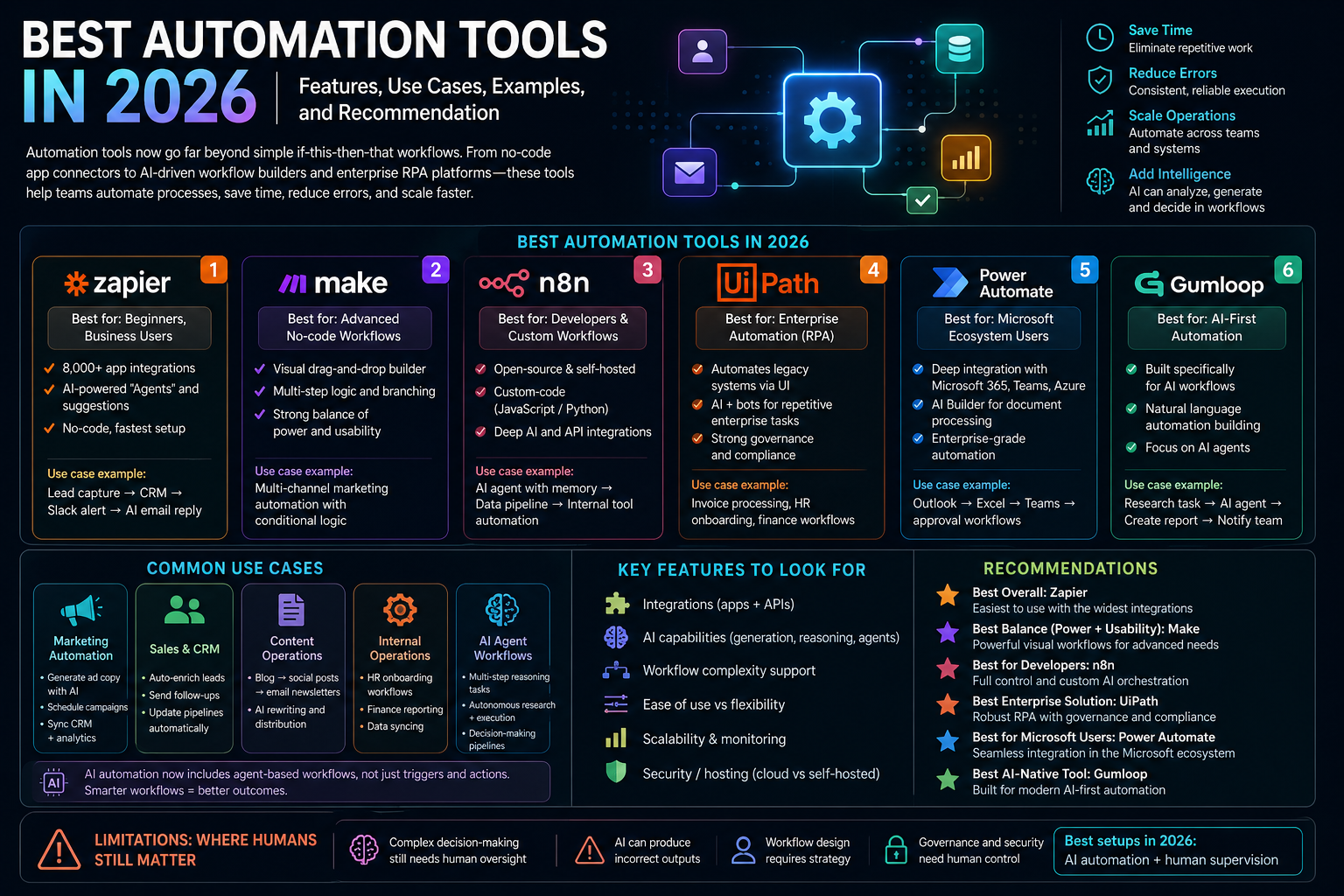
Introduction
Automation tools are platforms that remove manual steps from business processes by linking systems, triggering actions, applying logic, and moving work across teams or software. In practice, that can mean routing form submissions, enriching leads, syncing records, generating documents, creating tickets, or even automating a legacy desktop workflow that has no modern API.
This article was reviewed against official product pages and official documentation available on February 12, 2026. The goal is practical guidance. If you want one short answer, Zapier remains the easiest starting point for general business automation, but it is not the best answer for every environment.
What automation tools are
At a basic level, an automation tool listens for an event, evaluates logic, and performs an action. Modern platforms go further. They can orchestrate AI, manage approvals, support agents, log every run, expose APIs, and govern who can automate what.
| Automation type | What it means | Where it fits |
|---|---|---|
| App-to-app workflow automation | Connects SaaS tools through triggers, actions, filters, and branches. | Lead routing, alerts, CRM updates, ticketing, intake workflows. |
| AI automation | Uses LLMs or AI services inside the workflow for summarization, classification, extraction, or agentic decisions. | Inbox triage, content ops, support routing, document review. |
| RPA | Automates actions in desktop software and websites when APIs are missing or incomplete. | Legacy systems, back-office operations, reconciliations, data entry. |
| Enterprise orchestration | Coordinates apps, data, processes, humans, APIs, and governance on one platform. | Cross-functional processes, quote-to-cash, employee lifecycle, finance ops. |
Why automation tools matter
The business case is not just time savings. Good automation improves response speed, reduces human error, preserves process consistency, and lets teams operate with fewer handoffs. It also creates cleaner operations because the logic becomes visible instead of living in inboxes, spreadsheets, or tribal knowledge.
Faster execution
Work that used to wait for someone to notice an email or move a row in a spreadsheet can happen immediately.
Better consistency
Rules, approvals, and enrichment steps run the same way every time, which matters for compliance and quality.
More useful data
Automations can enrich, standardize, and route data at the time it enters the system instead of fixing it later.
Operational leverage
Teams can support more volume without growing headcount at the same rate.
Key features to look for
Not every automation tool solves the same problem. These are the features that usually matter most in real selection work.
| Feature | Why it matters | Questions to ask |
|---|---|---|
| Integration breadth | Broader connectors reduce custom work and let teams automate more of the real stack. | Does it support the apps, databases, APIs, and AI services you actually use? |
| Logic depth | Simple two-step automations are easy. Real processes need loops, branches, retries, approvals, and error handling. | Can it handle multi-step operational logic without becoming fragile? |
| Governance | As adoption grows, admins need roles, visibility, connection control, and audit history. | Who can build, deploy, edit, and monitor automations? |
| AI support | AI is increasingly part of workflow design for classification, summarization, extraction, and agentic action. | Can you use AI safely with guardrails, observability, and approval points? |
| Extensibility | Developers need APIs, custom code steps, webhooks, SDKs, or self-hosting in more advanced scenarios. | How do you move beyond templates once the workflow becomes unique? |
| Runtime fit | Some tools are best for cloud workflows; others are stronger for desktop automation, on-prem connectivity, or enterprise control. | Where does the workflow run, and what systems must it reach? |
Quick answer: which automation tool is best for what
If you want the fastest selection guide, start here.
| If you need... | Best fit | Why |
|---|---|---|
| Fastest business-team automation rollout | Zapier | Large app catalog, simple builder, approachable learning curve. |
| Visual logic for more complex workflows | Make | Scenario design is strong for branching, mapping, and visually following data movement. |
| Technical flexibility and self-hosting options | n8n | Strong fit for technical teams that want code-friendly customization and deployment control. |
| Large enterprise orchestration | Workato | Designed for enterprise integrations, governance, process orchestration, and agentic workflows. |
| Microsoft-heavy environments | Power Automate | Strong alignment with Microsoft 365, Power Platform, AI, and desktop flows. |
| RPA and legacy process automation at scale | UiPath | Strongest when desktop automation, process mining, and orchestrated robots are central. |
Best automation tools
1. Zapier
What it is: Zapier is a widely used automation platform focused on connecting apps, AI, and workflows with governed access.
Why it matters: It remains the easiest tool for many teams to deploy quickly without a large implementation project.
Best for: Sales ops, marketing ops, support workflows, lead routing, alerts, and general SaaS automation.
Limitations: Once workflows become deeply stateful or extremely enterprise-specific, some teams outgrow the simplest patterns.
2. Make
What it is: Make is a visual automation platform for building and orchestrating workflows and AI scenarios in real time.
Why it matters: It is especially good when you want to see how data moves through a process instead of hiding logic behind simple forms.
Best for: Multi-step data transformations, content pipelines, ecommerce operations, and teams that prefer visual debugging.
Limitations: Business users may still need more process discipline as scenarios become large and harder to govern.
3. n8n
What it is: n8n is a workflow automation platform known for technical flexibility, code-friendly nodes, and deployment control.
Why it matters: It appeals to developers and technically strong ops teams that want automation without giving up extensibility.
Best for: Internal tools, AI workflows, custom integrations, self-hosted setups, and engineering-adjacent operations.
Limitations: It is less plug-and-play for purely non-technical teams than the most beginner-friendly tools.
4. Workato
What it is: Workato positions itself as an orchestration platform for the agentic era, combining apps, data, APIs, process, and enterprise governance.
Why it matters: It is designed for complex operational systems where automation is part of core business architecture rather than team-level convenience.
Best for: Enterprise integration, process orchestration, quote-to-cash, employee lifecycle, and governed AI rollout.
Limitations: It is not the lightest-weight choice for simple startup-grade app automations.
5. Power Automate
What it is: Microsoft Power Automate is an end-to-end automation platform covering cloud flows, desktop flows, AI features, and orchestration.
Why it matters: It is very strong when workflows live around Microsoft 365, Teams, SharePoint, Excel, Dataverse, or the wider Power Platform.
Best for: Microsoft-centered businesses, approvals, documents, process mining, and mixed DPA plus RPA use cases.
Limitations: Cross-stack experiences can feel less elegant when your core environment is not already Microsoft-heavy.
6. UiPath
What it is: UiPath is a business automation platform focused on agentic automation, RPA, process intelligence, and orchestration.
Why it matters: It stays highly relevant when the real work includes screen automation, long-running processes, human-in-the-loop tasks, and process mining.
Best for: Large operations teams, finance back office, insurance, regulated workflows, legacy modernization, and enterprise RPA programs.
Limitations: It is often more platform than a small team needs for straightforward SaaS workflow routing.
Many practical examples
Capture a demo request and route it automatically
A form submission creates a CRM contact, enriches firmographic fields, posts a Slack alert, assigns an owner based on territory, and opens a follow-up task. Zapier or Make are usually enough here.
Classify inbound support email
A workflow reads inbound email, uses AI to classify urgency and topic, checks the customer account, and routes the case to the correct queue. n8n, Zapier, Make, and Workato can all handle versions of this pattern.
Automate invoice review and exception handling
A platform extracts data from invoices, validates fields against ERP rules, flags mismatches, and routes exceptions to a human approver. Power Automate, UiPath, and Workato are often better fits than lighter app-automation tools.
Provision systems after HR approval
Once a hire is approved, create accounts, permissions, Slack channels, onboarding tasks, and a hardware request. Workato and Power Automate are especially common in this process-heavy category.
Automate a system with no useful API
A robot logs into a desktop application, copies data from a spreadsheet or ERP source, and updates the old interface. This is classic UiPath territory and still a major real-world requirement.
Automate release and incident workflows
Create a workflow that reacts to GitHub events, pings Slack, creates incident tasks, updates status pages, and routes approvals. n8n or Make are often strong fits when engineering systems and APIs dominate the stack.
Admin and developer perspective
Automation selection changes when you look at it through an admin or developer lens. The question is not only "Can this automate the task?" It is also "Can we run this safely, visibly, and sustainably?"
| Role | What matters most | Good fit | Practical advice |
|---|---|---|---|
| Business admin / IT admin | Connection control, roles, audit history, policy boundaries, and shadow automation risk. | Zapier Enterprise, Workato, Power Automate, UiPath. | Evaluate governance before you optimize for builder convenience. |
| Ops lead | Throughput, reliability, turnaround time, exception handling, and ownership clarity. | Zapier, Make, Workato, Power Automate. | Map the end-to-end process first so you automate bottlenecks instead of random steps. |
| Developer / architect | Webhooks, APIs, code steps, self-hosting, testing, versioning, and observability. | n8n, Workato, UiPath, Power Automate. | Treat automation as production architecture, not just convenience scripting. |
| Security / compliance | Least privilege, data movement visibility, AI guardrails, and auditability. | Workato, UiPath, Zapier Enterprise, Microsoft stack. | Review what data leaves systems, where AI runs, and how failures are logged. |
Best practices
- Automate a process, not a symptom: start from the workflow goal and failure points, not from a random task you noticed yesterday.
- Keep human checkpoints where decisions matter: approvals, exceptions, and high-risk AI outputs should not be fully implicit.
- Name owners explicitly: every automation should have a business owner and, when appropriate, a technical owner.
- Design for retries and failure handling: production automation is about resilience, not only happy-path speed.
- Use least-privilege connections: do not grant a workflow more access than the process actually requires.
- Log inputs, outputs, and changes: observability is essential once automations become business-critical.
- Document dependencies: note which apps, credentials, fields, and teams the workflow depends on.
- Review AI steps separately: automation reliability and AI reliability are related but not identical concerns.
Limitations
Automation tools are powerful, but they do not erase process design work.
- Bad processes scale badly: automation can make a broken process run faster without making it better.
- Integrations still break: vendor APIs, field mappings, permissions, and rate limits change over time.
- AI adds variability: if you use LLM steps, you need stronger review patterns and guardrails.
- RPA is useful but fragile: UI changes and desktop environment differences can break automations.
- Governance becomes mandatory: once dozens of workflows exist, shadow automation becomes a real operational risk.
- Not every task should be automated: some work is too rare, ambiguous, or policy-heavy to justify the maintenance burden.
Recommendation
If you want one simple recommendation, start with Zapier for general business automation unless your architecture gives you a reason not to.
Choose Make when you need clearer visual modeling for more complex workflow logic. Choose n8n when your team is technical and values extensibility or self-hosting. Choose Workato when automation is becoming enterprise architecture, not just operational convenience. Choose Power Automate if your environment already lives in Microsoft 365 and Power Platform. Choose UiPath when the real challenge includes desktop automation, legacy applications, and process-heavy enterprise work.
For most organizations, the right answer is not buying the most powerful platform first. It is matching the tool to the process complexity, system landscape, governance needs, and operator maturity you actually have today.