
Introduction
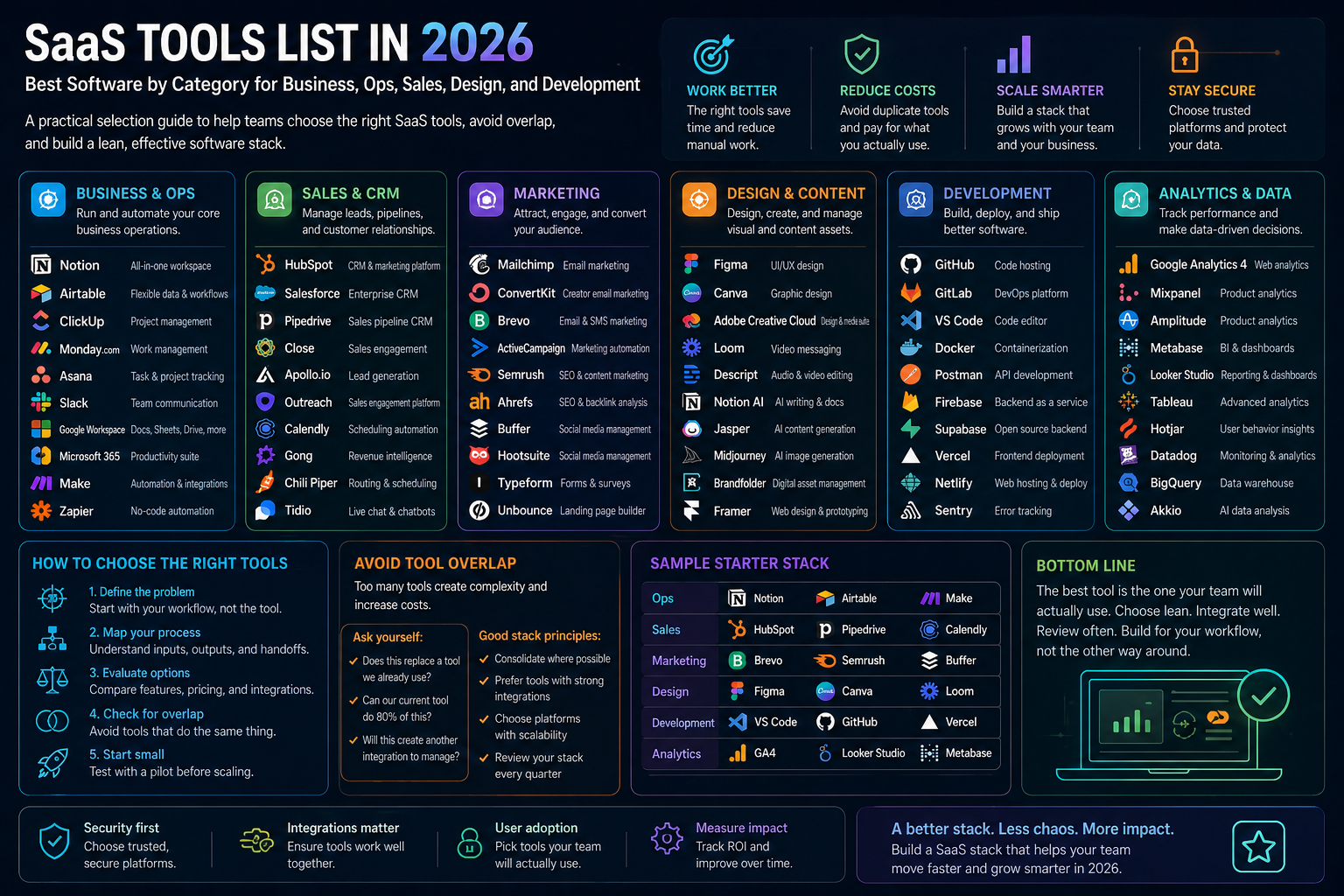
SaaS tools are software products delivered as online services instead of locally installed applications. The category is huge: collaboration, CRM, project management, ecommerce, payments, design, customer service, engineering, analytics, document workflows, and more.
This article was reviewed against official product pages and official documentation available on February 20, 2026. Instead of trying to list every SaaS product on the internet, I organized this guide around the most common business categories and the tools most teams repeatedly evaluate.
What SaaS tools are
A SaaS product is not just "software in the cloud." It is usually part of an operating model. Teams subscribe to it, configure it, integrate it, secure it, and make it part of daily execution.
| Category | What it does | Examples |
|---|---|---|
| Collaboration | Communication, meetings, shared context, and daily coordination. | Slack, Zoom, Notion. |
| Work management | Projects, tasks, goals, workflows, and operational planning. | Asana, Notion. |
| CRM and customer platform | Marketing, sales, service, and customer data workflows. | HubSpot. |
| Payments and commerce | Revenue collection, subscriptions, commerce operations, and online selling. | Stripe, Shopify. |
| Design and product | Collaborative design, prototypes, feedback, and handoff. | Figma. |
| Engineering | Source control, AI coding, reviews, CI, and software collaboration. | GitHub. |
| Document workflows | Electronic agreements, signatures, approvals, and digital paperwork. | DocuSign. |
Why SaaS tools matter
SaaS matters because most modern companies now run on software composition instead of one giant monolithic system. That creates speed and flexibility, but it also creates stack sprawl if decisions are not deliberate.
Faster adoption
SaaS tools usually reach usable value faster than custom systems because the product is already built and improving continuously.
Specialized capability
Each category can go deep in ways generic suites often cannot.
Better iteration
Teams can change tools or add layers over time instead of predicting every future requirement upfront.
New integration burden
The more SaaS you buy, the more important identity, automation, ownership, and data flow become.
How to evaluate a SaaS tool
A good SaaS selection process is not mainly about feature checklist theater. It is about fit.
| Evaluation area | Why it matters | Questions to ask |
|---|---|---|
| Workflow fit | The tool should support how work actually moves, not force daily workaround habits. | Does this match the process, owners, and collaboration style we already have? |
| Integration fit | Disconnected SaaS creates more manual work than it removes. | How well does it connect to the existing stack, identity, and automation layers? |
| Admin controls | As usage grows, admins need permissions, governance, auditability, and lifecycle control. | Can we onboard, secure, review, and offboard this tool responsibly? |
| Adoption likelihood | The best tool on paper fails if teams resist it or use it inconsistently. | Will the real users actually live in this tool every week? |
| Consolidation value | Some tools replace multiple point solutions and simplify the stack. | Does this reduce fragmentation or just add one more silo? |
| Developer surface | Some teams eventually need APIs, SDKs, webhooks, extensions, or custom integrations. | What happens when we need to automate or extend beyond the default UI? |
Quick answer: best SaaS tools by category
If you want the fastest answer, start here.
| Category | Recommended tool | Why |
|---|---|---|
| Team collaboration | Slack | Strong central work hub for communication, integrations, workflows, and AI-supported collaboration. |
| Connected workspace | Notion | Strong all-in-one fit for docs, knowledge, projects, and increasingly AI-centered work. |
| Structured work management | Asana | Strong for clarity, accountability, planning, and operational coordination. |
| Customer platform | HubSpot | Strong integrated fit for marketing, sales, service, content, and CRM context. |
| Payments | Stripe | Widely used financial infrastructure for payments, billing, and revenue workflows. |
| Ecommerce | Shopify | Strong end-to-end commerce platform for many brands and merchants. |
| Meetings and workplace collaboration | Zoom | Still strong for meetings and broader AI-first collaboration workflows. |
| Design collaboration | Figma | Strong multiplayer design, prototyping, and design-system collaboration. |
| Engineering platform | GitHub | Foundational for source control, AI coding workflows, review, and software collaboration. |
| Digital agreements | DocuSign | Still highly relevant when signature, contract, and agreement processes are central. |
SaaS tools list by category
Slack
Category: Team collaboration and work operating system.
What it is: Slack positions itself as a work operating system that brings people, apps, data, AI, and agents together.
Best for: Cross-functional collaboration, real-time coordination, app-driven workflows, and notification-centered operations.
Notion
Category: Connected workspace.
What it is: Notion combines docs, knowledge, projects, databases, AI, and custom agents in one workspace.
Best for: Teams trying to reduce tool sprawl across docs, wiki, projects, notes, and lightweight workflows.
Asana
Category: Work management.
What it is: Asana is a work management platform focused on projects, accountability, alignment, and AI-assisted execution.
Best for: Marketing operations, PMO, intake workflows, launches, and structured operational planning.
HubSpot
Category: CRM and customer platform.
What it is: HubSpot positions itself as an agentic customer platform built around Smart CRM and customer-facing teams.
Best for: Businesses that want marketing, sales, service, content, and CRM activity on one customer-centric platform.
Stripe
Category: Payments and revenue infrastructure.
What it is: Stripe provides financial infrastructure for payments, billing, subscriptions, and revenue workflows.
Best for: SaaS billing, ecommerce payments, platform monetization, and custom payment flows.
Shopify
Category: Ecommerce platform.
What it is: Shopify remains a leading hosted commerce platform for online selling, storefronts, checkout, and merchant operations.
Best for: DTC brands, online stores, growing commerce operations, and multi-channel sales.
Zoom
Category: Meetings and workplace collaboration.
What it is: Zoom Workplace is broader than meetings now, with AI Companion and workflow-oriented collaboration features.
Best for: Meetings, team chat, docs, and collaboration environments that still center heavily on synchronous communication.
Figma
Category: Product and design collaboration.
What it is: Figma is a collaborative design platform for interface design, prototyping, feedback, and design-system work.
Best for: Product teams, UX/UI work, handoff, stakeholder review, and shared design systems.
GitHub
Category: Engineering platform.
What it is: GitHub combines source control, collaboration, AI coding, and security capabilities into a developer platform.
Best for: Modern software teams that need version control, pull requests, AI assistance, and automation around code delivery.
DocuSign
Category: Agreement workflows.
What it is: DocuSign remains one of the most recognizable SaaS products for electronic signature and agreement processes.
Best for: Sales agreements, vendor approvals, legal workflows, HR documents, and signing-heavy operations.
Many practical examples
Lean SaaS setup for a small team
Use Slack for communication, Notion for docs and operating knowledge, HubSpot for CRM, Stripe for billing, Zoom for meetings, and GitHub for engineering. This gives a compact but capable operating stack.
Run campaigns and pipeline in connected tools
HubSpot manages leads, campaigns, forms, and customer records. Slack handles alerts and coordination. Asana tracks launch tasks. Zoom supports demos and handoffs.
Commerce-first SaaS stack
Shopify runs storefront and commerce operations, Stripe handles payments and billing extensions where needed, Slack coordinates operations, and Notion houses SOPs and campaign plans.
Collaborate from concept to release
Figma handles design exploration and prototypes, Notion houses specs and knowledge, Asana tracks delivery, Slack handles daily collaboration, and GitHub handles implementation and review.
Move deals faster with less document friction
HubSpot manages opportunity context, DocuSign handles signatures and approvals, Slack notifies stakeholders, and Stripe supports payment collection once the deal closes.
Run engineering on a modern SaaS stack
GitHub becomes the delivery backbone, Slack becomes the collaboration hub, Zoom handles live sessions, Notion captures architecture and decisions, and Figma supports product design collaboration.
Admin and developer perspective
From an admin and developer perspective, SaaS selection is less about feature envy and more about operational coherence.
| Role | What matters most | Practical advice |
|---|---|---|
| IT / admin | Identity, provisioning, permissions, auditability, vendor risk, and offboarding. | Prefer platforms that simplify governance instead of multiplying hidden admin burden. |
| Ops leader | Adoption, handoff quality, reporting consistency, and process ownership. | Buy the tool that best supports the workflow, not the tool with the broadest slide deck. |
| Developer / architect | APIs, webhooks, automation, extensibility, and data boundaries. | Check integration surfaces early or you may end up with manual glue work everywhere. |
| Leadership | Consolidation value, cost discipline, and strategic fit. | More SaaS is not maturity. Better software architecture for how teams operate is maturity. |
Best practices
- Choose by operating model: start with how work moves, not with a list of popular logos.
- Reduce overlap intentionally: if two tools solve the same problem, decide which one owns it.
- Map the integration path early: customer data, finance data, documents, and task flows should not live in isolated silos.
- Evaluate admin burden: provisioning, permissions, audit, and support effort matter as much as user features.
- Set ownership by category: one team should own collaboration tools, another might own CRM, another engineering stack decisions.
- Prefer adoption over theoretical power: the most advanced product is not useful if the team never truly adopts it.
- Use automation between tools: a SaaS stack gets stronger when systems share signals cleanly.
- Review the stack regularly: what made sense last year may now be redundant or underused.
Limitations
A SaaS tools list can guide selection, but it cannot replace direct evaluation in your environment.
- Category leaders are not universal winners: the best tool depends on team habits, business model, and system landscape.
- Stacks drift over time: new tools enter, old tools persist, and overlap grows quietly.
- AI positioning changes quickly: many SaaS products are evolving their AI and agent story rapidly.
- Integration quality varies: an advertised connector is not always the same as a deeply useful operational integration.
- Costs are more than license cost: admin overhead, training, and process change are real costs too.
- Best-of-breed creates complexity: specialized tools can outperform suites, but they raise architecture demands.
Recommendation
If you want one simple recommendation, build a compact SaaS stack around workflow fit and integration quality, not around brand prestige.
For many teams, a strong modern baseline is some combination of Slack, Notion, Asana, HubSpot, Stripe, Zoom, Figma, and GitHub, with additional category tools like Shopify or DocuSign where the business model requires them. That gives a practical foundation across collaboration, execution, customer operations, revenue, design, and engineering.
The real win is not collecting the "best SaaS tools." The real win is having a stack where each tool has a clear job, clean ownership, and useful integrations.