
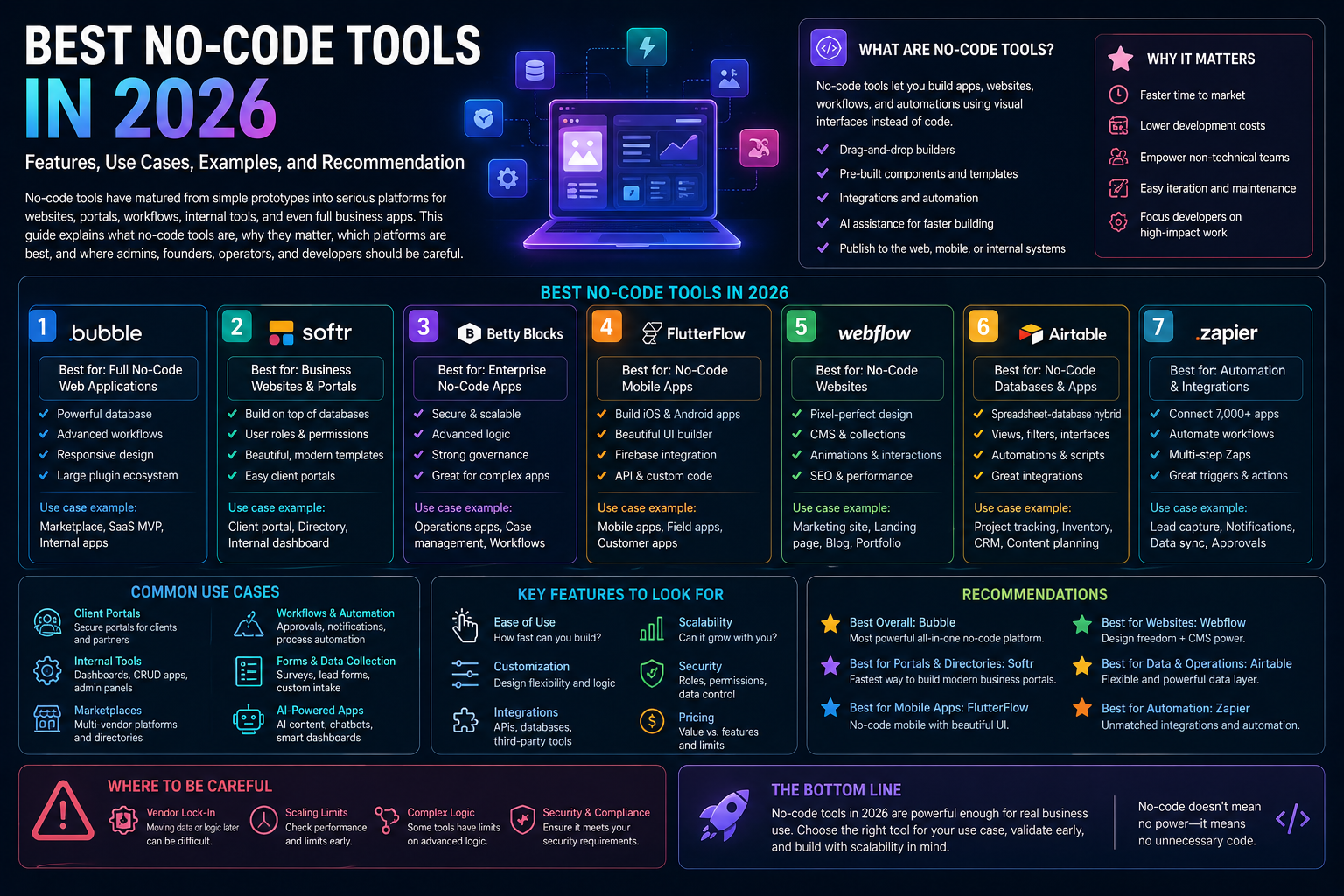
Introduction
No-code tools let teams build websites, apps, portals, internal tools, and operational systems with visual building blocks instead of traditional coding as the primary interface. That does not mean they eliminate technical thinking. Good no-code still requires data design, permission design, workflow design, and operational ownership.
This article was reviewed against official product pages and official documentation available on February 16, 2026. If you want one short answer, Webflow is the strongest no-code choice for serious websites, while Bubble remains one of the strongest no-code choices for more application-like products.
What no-code tools are
The no-code market is not one thing anymore. Some products are website systems, some are app builders, some are business databases with interfaces, and some are internal-tool platforms that blur the line between no-code and low-code.
| No-code type | What it means | Common use cases |
|---|---|---|
| Website builder | Visual publishing and CMS platform for websites and landing pages. | Marketing sites, brand sites, content hubs, microsites. |
| App builder | Visual system for frontend, backend logic, data, workflows, and user accounts. | Marketplaces, client products, dashboards, workflows, mobile apps. |
| Data-centric builder | Structured operational data with interfaces, automations, and workflow layers. | Project ops, inventory, CRM-like systems, requests, resource planning. |
| Portal and internal-tool builder | Fast assembly of dashboards, portals, forms, permissions, and business process UI. | Partner portals, client portals, internal apps, workflow consoles. |
Why no-code tools matter
No-code matters because many business software needs are real but not large enough to justify a full custom engineering project. Teams need systems that fit their workflow now, not six months later after a crowded backlog clears.
Faster time to value
Operators and founders can move from idea to usable system much faster than traditional custom builds.
Closer to business reality
The people closest to the workflow can shape the software instead of waiting for translation through many layers.
Lower cost of iteration
Changing a form, workflow, layout, or field structure is often much easier than changing custom code.
Useful for both experiments and operations
The strongest platforms can support both quick launches and steady process improvement after launch.
Key features to look for
No-code should not be judged only by how quickly you can drag components onto a screen. These are the features that usually decide whether the platform will still be useful after the first demo.
| Feature | Why it matters | Questions to ask |
|---|---|---|
| Data model strength | Weak data design becomes painful as soon as the app has many records, users, or workflows. | Can the tool handle your real entities, relationships, filters, and permissions? |
| Workflow logic | Serious no-code apps need conditions, approvals, automations, and integrations. | Is the logic layer strong enough for the process you are replacing? |
| Permissions | Portals and internal tools often live or die on role-based access. | Can you define who sees what, edits what, and triggers what? |
| Design control | Some tools are rigid but fast, while others are much more expressive visually. | How much do you need custom UX versus operational speed? |
| Extensibility | Eventually most teams need APIs, custom code, or developer handoff options. | What happens when a requirement exceeds the native builder? |
| Operational scalability | Many no-code successes fail later because governance, versioning, or maintainability were ignored. | How will this be managed after the first enthusiastic builder leaves? |
Quick answer: which no-code tool is best for what
If you want the fastest selection guide, start here.
| If you need... | Best fit | Why |
|---|---|---|
| A full app-like product without writing code | Bubble | Strong full-stack no-code story across UI, logic, data, and app behavior. |
| A serious visual website platform | Webflow | Strong visual development, CMS, optimization, and website operations fit. |
| Data-centric business operations | Airtable | Excellent when the core problem is structured operational data, interfaces, and workflow logic. |
| Fast internal business apps on existing data | Glide | Very approachable for turning spreadsheet or database-backed processes into usable apps quickly. |
| Portals and operational frontends | Softr | Strong for portals, dashboards, and app-style frontends on top of business data. |
| Internal tools with more developer control | Retool | Fast internal software platform with AI, components, code support, and strong connector depth. |
Best no-code tools
1. Bubble
What it is: Bubble is a no-code platform for building web and mobile apps with AI prompting, visual editing, built-in data, logic, and security features.
Why it matters: It is still one of the clearest answers when no-code needs to feel like an actual application platform rather than a form builder.
Best for: SaaS prototypes, client-facing apps, marketplaces, workflow apps, and founders validating products.
Limitations: Complex apps still require disciplined architecture or they become harder to maintain.
2. Webflow
What it is: Webflow is a visual-first website experience platform spanning site building, CMS, analytics, and optimization.
Why it matters: It is a stronger fit than general no-code app tools when the primary outcome is a high-quality website and content operation.
Best for: Marketing sites, brand sites, content hubs, campaign pages, and teams that want design control without hand-coding every page.
Limitations: It is not the first choice for relational internal tools or process-heavy apps.
3. Airtable
What it is: Airtable is a platform for building business apps, interfaces, automations, and AI-powered workflows around structured data.
Why it matters: It is especially useful when your problem is operational coordination, not just page design.
Best for: Resource planning, project ops, content ops, approvals, request systems, campaign operations, and lightweight CRMs.
Limitations: Highly custom frontend experiences can push teams to pair Airtable with another interface layer.
4. Glide
What it is: Glide is a no-code app builder for turning spreadsheets and connected data into polished business apps with workflows.
Why it matters: It is one of the easiest ways to replace spreadsheet-heavy manual processes with usable software quickly.
Best for: Field operations, internal tracking apps, lightweight mobile-friendly business systems, and team workflows.
Limitations: It is less suited to highly custom software behavior than the most application-centric platforms.
5. Softr
What it is: Softr is a no-code platform for building AI-powered business apps, portals, dashboards, and internal tools.
Why it matters: It is especially practical for ops teams that need secure portals and usable frontends over business data without long setup cycles.
Best for: Client portals, partner portals, dashboards, internal tools, directories, and workflow-centric apps.
Limitations: If you need very deep custom application behavior, you may want a more developer-flexible platform.
6. Retool
What it is: Retool is an app-building platform for polished internal software with visual components, code, connectors, and AI-assisted generation.
Why it matters: It is one of the best tools when internal software needs to be fast to build but still close to developer workflows.
Best for: Internal admin tools, operations consoles, support dashboards, review tools, and engineering-adjacent software.
Limitations: Retool is more no-code-plus-developer than no-technical-skill-required.
Many practical examples
Build a client portal without a custom app project
A services company creates a secure portal where clients can view project status, invoices, documents, and requests. Softr and Glide are especially practical here.
Launch a working product before hiring a full engineering team
A founder builds a marketplace, user onboarding, payments flow, and admin interface in Bubble to validate demand before committing to a full rewrite.
Create a serious brand and content website
A growth team uses Webflow for a visual-first site, CMS-managed landing pages, and iterative content publishing without waiting on front-end release cycles.
Replace spreadsheet reporting with a live app
Airtable or Glide can turn scattered operational data into a live dashboard for campaign planning, inventory, staffing, or fulfillment tracking.
Give support or finance a real work console
Retool can combine database queries, API calls, forms, review queues, and role-based actions into a usable internal operating surface.
Build a custom business system instead of buying three point solutions
Airtable plus interfaces and automations can become a shared operating layer for requests, approvals, assignments, and reporting.
Admin and developer perspective
No-code is often misunderstood as a developer replacement story. In practice, the better framing is operational leverage. No-code helps teams solve software gaps faster, while admins and developers still matter for architecture, governance, integration, and hard edges.
| Role | What matters most | Good fit | Practical advice |
|---|---|---|---|
| Founder / business owner | Speed, flexibility, and cost of getting a usable system live. | Bubble, Webflow, Glide. | Choose based on the product shape, not just the easiest demo experience. |
| Business admin / ops admin | Permissions, data quality, change management, process clarity. | Airtable, Softr, Glide. | Document ownership and approval paths before the tool spreads across teams. |
| Developer / architect | API access, maintainability, portability, custom logic, and scale boundaries. | Retool, Bubble, Airtable. | Design escape hatches early so the system can evolve instead of hitting a platform wall. |
| Marketing team | Publishing speed, visual control, CMS workflow, and experimentation. | Webflow. | Keep content governance and SEO operations as first-class concerns, not afterthoughts. |
Best practices
- Start with the data model: weak structure causes more problems later than weak UI polish.
- Use role-based permissions early: especially for portals, approvals, and internal tooling.
- Decide the system of record: know where the canonical data lives before connecting multiple tools.
- Document workflows: no-code apps can become fragile if logic only exists in one builder’s head.
- Build for iteration, not perfection: the main advantage of no-code is rapid improvement with real usage feedback.
- Keep integration boundaries clear: use automation platforms or APIs intentionally instead of layering accidental complexity.
- Review vendor lock-in risk honestly: speed now can be worth it, but you should know the tradeoff.
- Bring developers in at the right moments: especially for authentication, external APIs, compliance, and scale questions.
Limitations
No-code tools solve many problems well, but they are not magic.
- Complexity still exists: removing handwritten code does not remove workflow complexity, data complexity, or product complexity.
- Platform boundaries are real: every no-code tool has limits around customization, scale, logic, or integrations.
- Maintainability can drift: fast-building energy can create confusing systems if no one governs naming, data, and workflow standards.
- Portability is limited: some builds are hard to migrate cleanly later.
- Security and permissions still matter: especially for customer data, internal operations, and regulated processes.
- Custom software is still better sometimes: if the workflow is central to your product differentiation, no-code may eventually become a stepping stone rather than the final answer.
Recommendation
If you want one simple recommendation, choose the no-code platform based on the shape of the outcome, not on the label "no-code".
Choose Webflow for websites. Choose Bubble for app-like products. Choose Airtable when structured business data is the center of gravity. Choose Glide when you need a fast operational app over existing data. Choose Softr when portals and workflow frontends are the priority. Choose Retool when internal tools need more developer-grade control without rebuilding everything from scratch.
For most teams, the best no-code decision is the one that balances speed, data clarity, permissions, integration depth, and future maintainability, not just the one that looks easiest in a launch video.