
Why this work matters
Salesforce teams often underestimate how much delivery time disappears into documentation, support explanation, release packaging, and operational alignment. These are ideal AI use cases because the work is repetitive, language-heavy, and usually dependent on translating technical truth for multiple audiences.
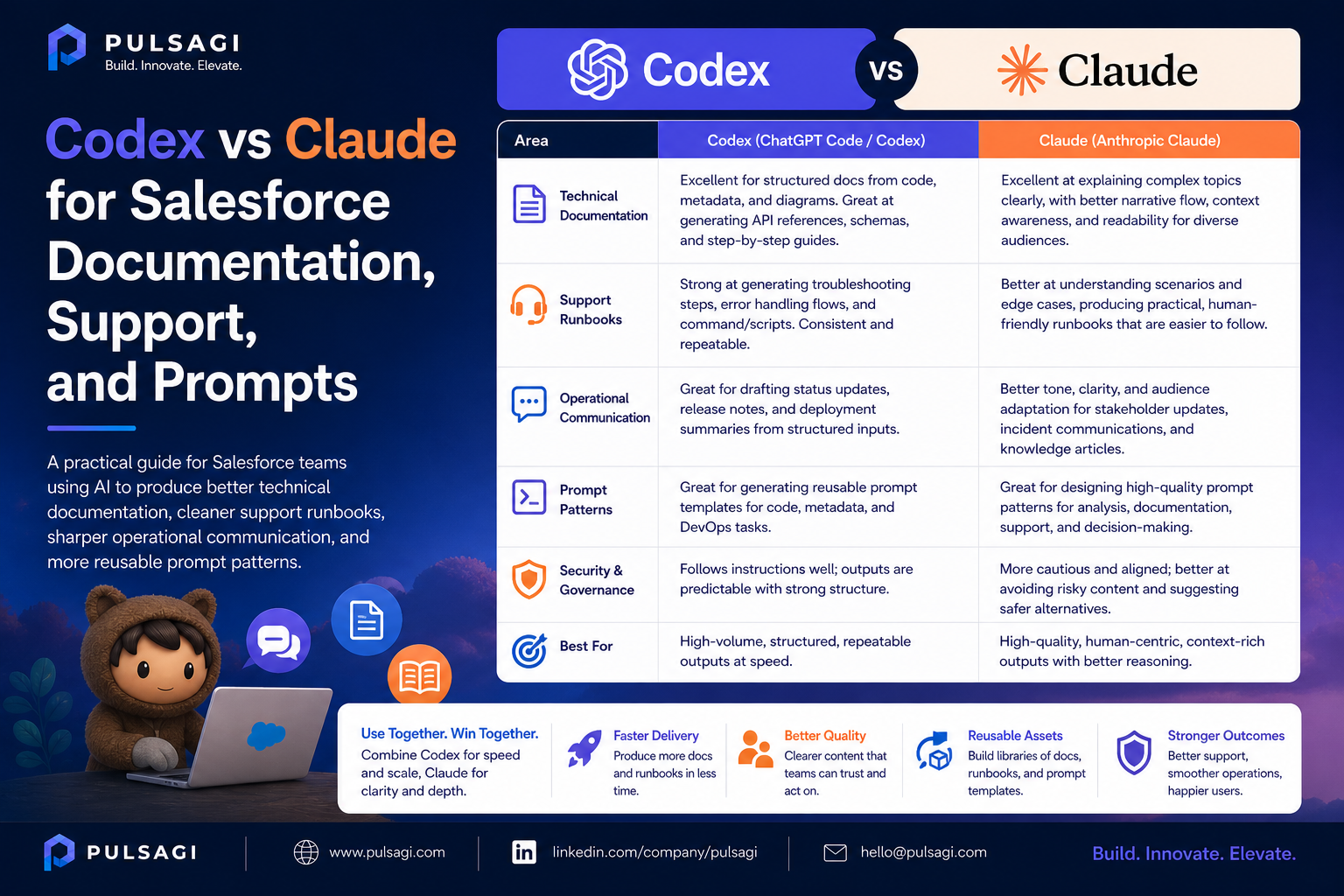
Claude is usually the stronger first draft partner here because it handles structure, tone, and multi-audience writing well. Codex becomes useful when the document needs to be grounded in the actual codebase, metadata, or diff rather than memory or guesswork.
Documentation use cases
Strong Salesforce documentation is not just about completeness. It is about usefulness for the next team that has to operate, extend, or troubleshoot the solution. AI can help speed up first drafts, but human owners still need to validate the final artifact.
- Technical design documents, low-level designs, and architecture decision records.
- Admin guides, Flow notes, and configuration runbooks.
- Release notes for business users, support teams, and technical reviewers.
- Knowledge articles, onboarding guides, and hypercare summaries.
Support and operations use cases
Support teams need speed, but they also need evidence. AI can help summarize incident timelines, translate logs into readable hypotheses, and draft KB articles or workaround notes. It should not become a substitute for root-cause validation.
| Support artifact | Best AI contribution |
|---|---|
| Incident summary | Clear timeline, affected users, suspected fault area, and next steps |
| RCA draft | Readable explanation of symptom, trigger, containment, and permanent fix options |
| KB article | User-facing steps, support notes, and escalation context |
| Operations handoff | Known issues, monitoring points, and support ownership |
Prompt engineering for Salesforce teams
Prompt quality affects output quality more than most teams realize. Good Salesforce prompts should define the role, business context, constraints, output format, risk areas, and review expectations.
| Prompt pattern | Why it works |
|---|---|
| State the role | "Act as a Salesforce solution architect" sets the expected thinking style. |
| Describe the artifact | Ask for stories, test cases, Flow outline, or release note draft explicitly. |
| Add constraints | Standard-first, bulk-safe, secure, support-friendly, or admin-maintainable constraints improve relevance. |
| Request assumptions and risks | This prevents overly confident but incomplete output. |
| Request validation notes | Ask what must still be checked by a human before implementation or publication. |
Admins benefit from prompts that emphasize business clarity and maintainability. Developers benefit from prompts that emphasize correctness, tests, and security. Support teams benefit from prompts that emphasize evidence and containment.
Best practices and limitations
- Assign a named human owner to every AI-generated document.
- Use Codex when documentation needs code-level truth, not memory-based summaries.
- Use Claude when the output needs clean language for executives, admins, or cross-functional teams.
- Never paste secrets, raw tokens, or unnecessary production data into prompts.
- Do not send AI-generated RCA or customer-facing communication without technical validation.
The biggest limitation is polish hiding weakness. A beautifully written AI document can still be technically incomplete. That is why documentation review should focus on accuracy first and tone second.
Recommendation
For Salesforce documentation and support work, use Claude for first-draft structure and communication quality. Use Codex to extract implementation truth and reduce drift between the document and the real system. That combination gives teams faster output without sacrificing credibility.