
Introduction
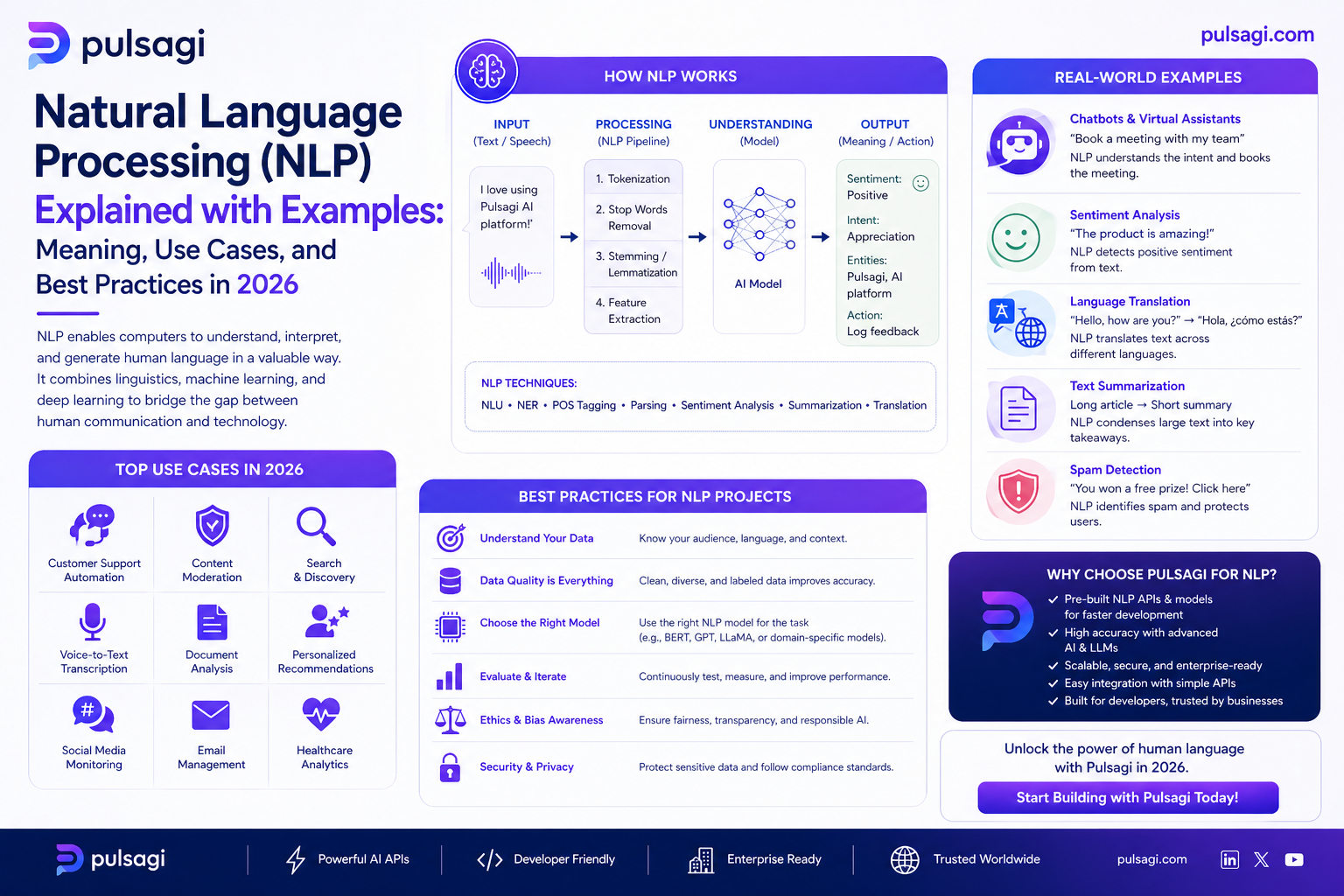
Natural language processing sits at the intersection of language and computation. Older NLP pipelines focused heavily on tokenization, rules, statistical features, and task-specific models. Modern NLP still uses some of those ideas, but large pretrained models and transformer architectures expanded what is possible.
This article was reviewed against official framework and documentation sources available on March 6, 2026. If you want one short answer, NLP is the set of techniques that help software turn raw language into useful structure, prediction, retrieval, generation, or action.
What NLP is
At a practical level, NLP means taking text or speech-derived text and doing something useful with it. That "something useful" can be simple, like tagging sentiment, or much more advanced, like answering questions over a policy document.
Many NLP systems move through several layers of understanding. A pipeline may tokenize words, identify sentence boundaries, map words to vectors or embeddings, detect entities, infer intent, and then route the result into a business decision or user-facing response.
Why NLP matters
Most organizations have more language than they can process manually: emails, tickets, contracts, support chats, meeting notes, comments, knowledge articles, policies, and product feedback. NLP matters because it turns that flood of language into searchable, classifiable, and automatable signals.
Business reality: the ROI of NLP often comes from triage speed, information retrieval, operational consistency, and reducing the time humans spend manually reading routine text.
Core NLP tasks
| Task | What it does | Example |
|---|---|---|
| Text classification | Assigns a label to a piece of text. | Mark a review as positive, negative, or neutral. |
| Named entity recognition | Finds people, companies, locations, dates, and other entities. | Extract "Ravi", "Pune", and "tomorrow" from a support request. |
| Dependency parsing | Analyzes grammatical relationships between words. | Identify which noun a verb belongs to inside a sentence. |
| Summarization | Compresses longer text into a shorter version. | Turn a meeting transcript into action items. |
| Question answering | Finds or generates answers from source content. | Answer "What is the refund policy?" from a help center. |
| Translation | Converts text between languages. | Translate support macros into Spanish. |
Many practical examples
NLP becomes much clearer when mapped to real work.
Classify customer feedback
A feedback message such as "The onboarding was confusing, but the support engineer solved it fast" can be scored for tone and grouped with similar feedback. This helps teams understand what is hurting satisfaction at scale.
Detect intent from free text
If a user writes, "I cannot reset MFA after changing my phone," NLP can classify the issue type, extract key entities, and send the case to the right queue without waiting for a human triage pass.
Extract structured data from language
From a message like "Please ship the replacement to Ravi Sharma at 22 MG Road, Pune on Friday," an NLP system can extract the person, address, city, and date.
Make knowledge bases easier to use
NLP improves search by matching meaning, not only exact keywords. That matters when users ask for "login help" but the knowledge article title says "account access troubleshooting."
Condense long text into action
A one-hour customer success call can be reduced into a concise summary, risk flags, next steps, and a CRM note. That is a classic operations win for NLP.
Screen text at scale
Moderation systems use NLP to detect abusive language, policy violations, or risky disclosures. The decision often combines rules, classifiers, and review thresholds.
Admin and developer perspective
Admins and developers should treat NLP as an operational layer, not only an AI feature.
| Role | What matters most | Practical advice |
|---|---|---|
| Business admin / IT admin | Data handling, review policy, language coverage, and safe automation boundaries. | Do not let NLP actions run blindly on sensitive workflows without explicit thresholds and review paths. |
| Developer / ML engineer | Preprocessing, model choice, latency, retrieval quality, and evaluation by task. | Choose the simplest task framing that works. Not every text workflow needs a generative model. |
| Operations lead | Throughput, queue accuracy, and measurable labor savings. | Start where language is repetitive and manual review is expensive. |
Best practices
- Define the task clearly: classification, extraction, summarization, retrieval, and generation have different success criteria.
- Keep evaluation grounded: accuracy for text classification is not the same as quality for summarization.
- Use source truth when possible: retrieval and grounded prompts are safer than freeform guessing.
- Watch language variation: spelling errors, slang, abbreviations, and multilingual input can change model behavior.
- Separate assistive and autonomous modes: suggestion-only NLP is operationally different from systems that take action automatically.
- Preserve human escalation: ambiguous or sensitive cases should remain easy to review manually.
Limitations
- Language is ambiguous: the same sentence can imply different things depending on context.
- Domain vocabulary matters: product jargon, legal wording, and internal abbreviations can break generic models.
- Generation can hallucinate: especially when not grounded in source material.
- Evaluation is task-specific: a model that is good at sentiment may still be poor at extraction or summarization.
- Governance still matters: privacy, retention, moderation, and approval rules do not disappear because the model is language-based.
Recommendation
If you are starting with NLP, begin with a narrow, measurable task such as ticket classification, entity extraction, or summarization over approved content. Those give clearer ROI and cleaner evaluation than starting with an open-ended "AI assistant" pitch.
For most teams, the strongest NLP journey is progressive: first classify, then extract, then retrieve, and only then automate or generate where the evidence is strong enough.