
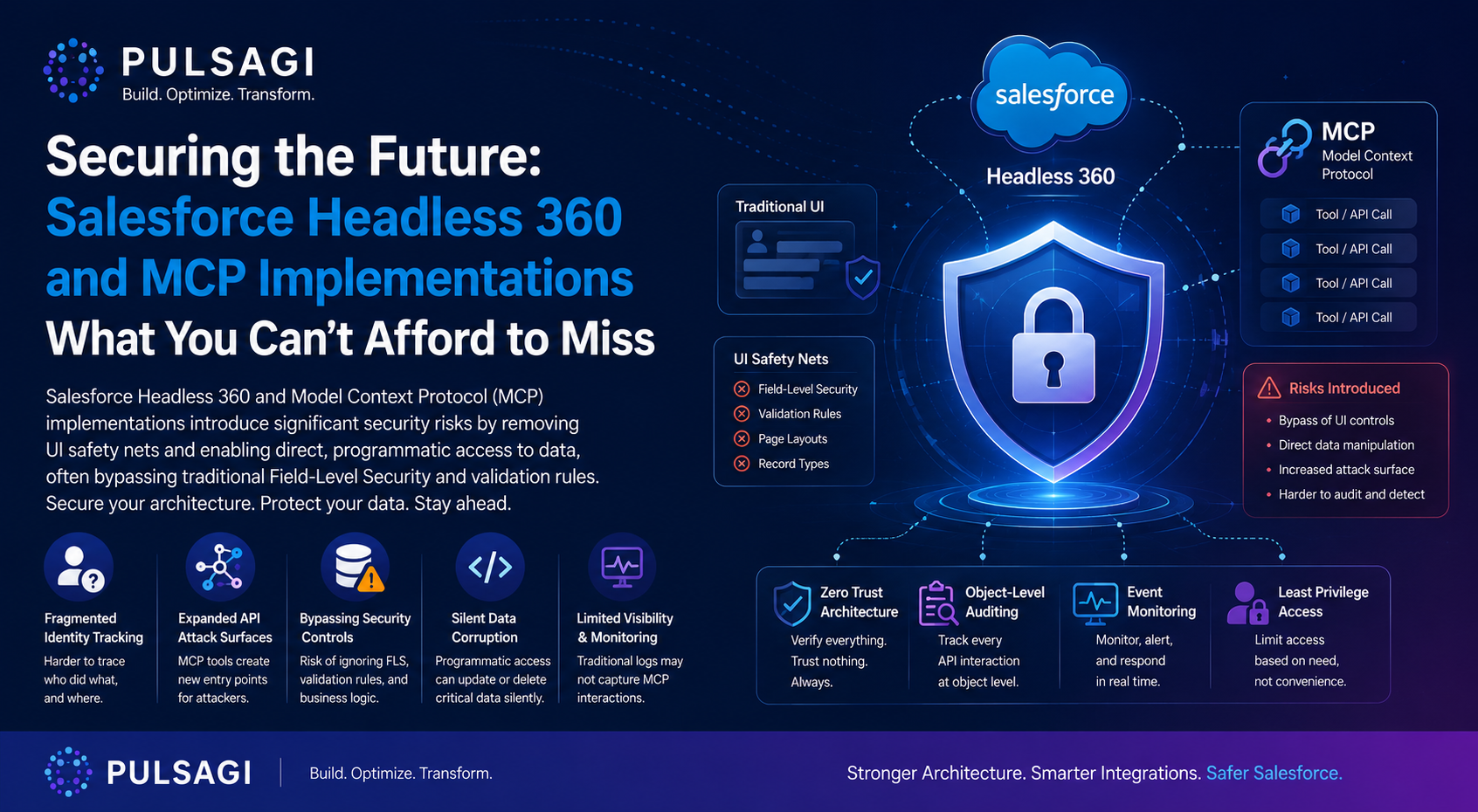
Introduction
Salesforce Headless 360 is a meaningful platform shift because it takes capabilities that were traditionally consumed through pages, buttons, and user journeys and exposes them through APIs, MCP tools, and CLI-driven workflows. That is exactly why it is strategically important for AI agents. It is also exactly why security conversations have to get sharper.
Make no mistake: Headless 360 is not just an integration decision. It is a security architecture decision. When an autonomous agent can inspect records, summarize them, update them, and hand results to Slack, Claude, ChatGPT, or another client without a human reviewing each step in the Salesforce UI, the old comfort of "the user will see what they are doing" disappears.
That does not mean Headless 360 is inherently unsafe. In fact, Salesforce is explicitly positioning it on top of the platform's existing trust model. But it does mean teams must stop relying on UI friction, manual review, or broad integration users as their hidden control strategy. Security has to become explicit in the tool contract, the OAuth setup, the permission model, the Apex patterns, and the monitoring layer.
What Headless 360 changes
Salesforce's own Headless 360 announcement frames the shift clearly: everything important on Salesforce is becoming an API, MCP tool, or CLI command that agents can use. That changes how work is executed in four practical ways.
Work moves from screens to tools
Instead of a human navigating record pages, an MCP client or external app can call discrete operations directly. The execution path becomes faster and less visible to business users.
OAuth becomes the front door
External Client Apps, scopes, refresh tokens, PKCE, callback URLs, and client distribution settings now matter as much as profile setup or page layout design.
Tool design becomes governance
The real question is no longer just "can this user access the object?" It becomes "what exact business action is this tool allowed to perform, under what conditions, and for which persona?"
Activity spreads across clients
Salesforce may remain the system of record, but activity can now originate from Slack, Postman, ChatGPT, Claude, Cursor, custom portals, and other MCP-capable clients.
For security teams, the headline is simple: Headless 360 expands the attack surface and compresses reaction time. The same trust model must now hold under machine-speed execution, cross-surface routing, and more fragmented identity flows.
Key features and functionality
To secure Headless 360 well, you need to understand which parts of the stack are actually doing the work.
| Capability | What it does | Why security teams should care |
|---|---|---|
| Hosted MCP Servers | Expose Salesforce data and actions as MCP-consumable tools for external AI clients. | They turn Salesforce into an agent-usable action plane, so over-broad tools or weak OAuth design can quickly create a large blast radius. |
| External Client Apps | Register third-party clients and define OAuth flows, scopes, callback URLs, token policies, and access rules. | Misconfigured token settings, permissive user access, or poor secret hygiene can hand attackers a clean path into your org. |
| Custom MCP tools | Wrap Flow, Apex, API Catalog, or custom operations into persona-specific tools. | Tool boundaries matter more than ever. A well-designed business action is safer than exposing raw reads and writes across many objects. |
| Agent clients and surfaces | Let users interact with Salesforce from conversational or developer environments instead of the core UI. | Data can now move across more trust boundaries, which raises exfiltration, prompt-injection, and monitoring challenges. |
| Observability and tracing | Provide post-launch insight into agent behavior, tool invocation paths, and response quality. | Without high-quality traces, proving who did what becomes difficult when actions span end users, agents, OAuth tokens, and server-side tools. |
If you want a broader orientation to the platform direction itself, see Salesforce Headless 360: Practical Setup Guide. This article focuses on the security model that sits underneath that direction.
Common use cases
Most enterprises will not adopt Headless 360 for novelty. They will use it to remove repetitive navigation and give people faster access to data and actions in the tools they already use.
- Sales briefing agents: summarize account, opportunity, case, and activity context before a meeting.
- Service triage assistants: read case history, suggest a next action, and prepare escalation details.
- Slack or chat-based record workflows: let teams inspect status, request decisions, or trigger guided business actions from a conversational surface.
- Developer and admin copilots: inspect metadata, generate code, or run org-aware tasks without opening multiple Salesforce setup screens.
- Custom business tools for AI agents: expose narrow operations like "prepare renewal risk summary" instead of teaching an agent how to orchestrate five low-level calls on its own.
These are strong use cases. The mistake is assuming strong use cases automatically mean strong controls. They do not.
Why the risk profile is different
Traditional UI-driven Salesforce work includes a surprising amount of natural friction. A user opens a page, scans context, clicks a button, sees a validation error, rethinks, and tries again. None of that is formal security, but it does slow down mistakes and make activity easier to notice.
Headless 360 removes that pacing. An agent can query, reason, branch, retry, and call other tools in seconds. If the underlying toolset is broad, the model is misdirected, or the identity boundary is weak, bad outcomes happen faster and at larger scale.
Less human review
Decisions that previously happened on-screen can now happen inside prompts, tool descriptions, or autonomous orchestration paths.
More privileged pathways
Custom Apex, integration users, and raw tool exposure can create access patterns that are broader than the human UI experience.
More audit complexity
Investigations now have to connect the end user, the MCP client, the OAuth token, the invoked tool, and the downstream Salesforce action.
Higher transaction volume
Agents do not get tired, and they do not pause. That means permission mistakes and limit issues can scale much faster than user mistakes.
Top security risks
The most important Headless 360 risks are not theoretical. They come directly from how the architecture works.
| Risk | What goes wrong | Practical control |
|---|---|---|
| Expanded blast radius from excess permissions | An agent or integration account with broad read or edit access can inspect, update, or delete far more data than the use case really requires. | Use per-persona tool sets, least-privilege permission sets, and user-context enforcement such as WITH USER_MODE for custom data access. |
| Identity fragmentation and weak traceability | Security teams struggle to prove whether an action came from the end user, the external AI client, a proxy layer, or a reusable backend token. | Log user identity, client identity, tool name, object touched, timestamp, and outcome together. Favor per-user OAuth over shared integration identities where possible. |
| Data leakage through prompts and routing | A misdirected prompt or poorly bounded tool can retrieve sensitive customer data and send it to Slack, a chat client, or another external service. | Minimize data returned by tools, classify sensitive fields, block broad export-style tools in early phases, and require human review for outbound workflows. |
| Silent policy bypass through system-mode code | If a custom tool calls Apex that runs with elevated privileges or ignores FLS and CRUD, the agent can do what the UI would have prevented. | Use explicit sharing keywords, secure Apex patterns, WITH USER_MODE, or Security.stripInaccessible() where graceful degradation is needed. |
| Credential exposure and token misuse | Stolen tokens, weak redirect URI handling, or poor client registration patterns can give attackers direct access to protected Salesforce resources. | Use PKCE, exact callback URLs, token revocation processes, permission-set-based app access, secure client secret handling, and short review cycles for new external clients. |
| MCP trust-boundary failures | Poor token audience validation, token passthrough, confused deputy issues, or SSRF-style behavior in intermediary layers can let clients reach systems they should not. | Validate token audience, avoid token passthrough, review proxy behavior carefully, and treat every MCP intermediary as part of the production attack surface. |
| Governor limit and volume excursions | Autonomous retries, large fan-out reads, and chain-invoked automations can create spikes that degrade org performance or fail business processes. | Start with narrow tools, bulk-safe Apex, defensive limits, and monitoring for API usage, failures, and retry storms before enabling broader write actions. |
The important pattern across all seven is that the failure usually starts before the model makes a bad decision. It starts when the architecture gives the model too much power, too little context, or too little accountability.
Safer architecture pattern
The safest Headless 360 design is usually not "give the agent Salesforce access." It is "give the agent one narrow business tool at a time, in the user's context, with a traceable contract."
A strong first pattern looks like this:
- Create a dedicated External Client App for the target client and persona.
- Restrict app access with permission-set-based preauthorization where possible.
- Expose a persona-specific custom MCP server instead of a broad all-tools server.
- Prefer business actions over raw CRUD, for example
summarizeOpenEscalationsinstead of free-form case reads plus updates. - Implement custom Apex tools with
with sharingand user-context enforcement. - Keep writes behind explicit confirmation until the workflow is proven in production.
This simple Apex pattern is much safer than a privileged raw data utility because it keeps the contract narrow and the security intent obvious.
public with sharing class CaseHealthAction {
    @InvocableMethod(
        label='Get Case Health Summary'
        description='Returns a safe summary for one or more Cases.'
    )
    public static List<CaseHealthResponse> summarize(List<CaseHealthRequest> requests) {
        Set<Id> caseIds = new Set<Id>();
        for (CaseHealthRequest req : requests) {
            if (req != null && req.caseId != null) {
                caseIds.add(req.caseId);
            }
        }

        List<Case> cases = [
            SELECT Id, CaseNumber, Subject, Status, Priority, Owner.Name
            FROM Case
            WHERE Id IN :caseIds
            WITH USER_MODE
        ];

        List<CaseHealthResponse> results = new List<CaseHealthResponse>();
        for (Case item : cases) {
            CaseHealthResponse res = new CaseHealthResponse();
            res.caseId = item.Id;
            res.caseNumber = item.CaseNumber;
            res.summary = item.Priority + ' priority case in ' + item.Status;
            results.add(res);
        }
        return results;
    }

    public class CaseHealthRequest {
        @InvocableVariable(required=true)
        public Id caseId;
    }

    public class CaseHealthResponse {
        @InvocableVariable
        public Id caseId;

        @InvocableVariable
        public String caseNumber;

        @InvocableVariable
        public String summary;
    }
}
This does not solve every problem, but it does three useful things immediately. It keeps sharing explicit, it keeps object and field access aligned with the user context, and it narrows the agent's freedom to one readable business function instead of unbounded record exploration.
Admin and developer controls
Strong Headless 360 security is a joint operating model. Admins cannot solve it alone, and developers should not treat it as a pure OAuth configuration exercise.
Admin controls
- Use separate External Client Apps for materially different clients or trust zones.
- Review callback URLs, scopes, token policies, and who is preauthorized to use the app.
- Keep permission sets narrower than the human role if the agent only needs a subset of actions.
- Prefer persona-specific custom MCP servers over broad defaults.
- Start with read-only tools for the first production rollout.
Developer controls
- Do not expose raw record manipulation when a narrow business action will do.
- Use explicit sharing behavior and modern secure data-access patterns in Apex.
- Design tools to return minimal data instead of whole records by default.
- Make destructive actions obvious in the tool description and require confirmation upstream.
- Test negative permission scenarios, not only happy paths.
If your team still has older secure Apex patterns in circulation, revisit WITH SECURITY_ENFORCED in Apex Explained and USER_MODE vs SECURITY_ENFORCED vs stripInaccessible. Headless 360 increases the cost of getting those choices wrong.
Monitoring and traceability
Security without monitoring is guesswork. In Headless 360, that is especially dangerous because a single prompt can trigger a chain of reads, tool calls, retries, and downstream actions.
At minimum, teams should be able to answer these questions after an incident:
- Which end user initiated the interaction?
- Which client or agent surface made the request?
- Which External Client App and token were used?
- Which MCP tool or Apex action ran?
- Which objects, fields, or records were touched?
- What was returned, changed, or routed externally?
Salesforce Event Monitoring and related observability features matter more in this model because they help you reconstruct activity that no human ever saw inside the core UI. They also help you detect permission changes, usage spikes, and suspicious API behavior earlier.
Rollout checklist
If you are moving from experiment to pilot, this is the checklist I would use before approval.
- Document the exact use case and why headless access is justified.
- Define the smallest possible tool set for that persona.
- Use a dedicated External Client App, not a recycled general-purpose one.
- Confirm the permission model with negative tests for restricted users.
- Review custom Apex for sharing, CRUD, FLS, and system-mode surprises.
- Decide which actions require human approval before execution.
- Enable monitoring that can reconstruct user, tool, and token activity.
- Test revocation, rollback, and incident response before go-live.
If any of those eight items is still hand-wavy, the rollout is probably not ready.
Recommendation
Salesforce Headless 360 is absolutely worth taking seriously. The direction is right, and the productivity upside is real. But the winning pattern is not maximum exposure. It is governed exposure.
My practical recommendation is to start with read-heavy assistants, persona-specific custom MCP servers, per-user OAuth where feasible, and business-action tools that are narrow enough to review line by line. Treat system-mode Apex, shared integration identities, unrestricted tool catalogs, and vague audit stories as launch blockers, not documentation gaps.
If you do that, Headless 360 can become a controlled enterprise capability. If you do not, it can become the fastest path to low-visibility data access your org has ever deployed.